Best Tools for Qualitative Researchers in 2026


For early-career researchers, the best qualitative research tools preserve methodological control across the full research workflow. A transcription service, CAQDAS platform, reference manager, or AI-assisted coding feature can all shape how participant accounts are captured, segmented, retrieved, interpreted, and eventually written into claims. Tool choice therefore affects the evidentiary path between fieldwork, analysis, and publication.
In this guide, qualitative research tools refers to the full set of software and workflow systems you use to collect, transcribe, organize, code, analyze, synthesize, and write from qualitative data, including interviews, focus groups, field notes, documents, open-ended survey responses, and digital ethnographic material.
As academic researchers, we evaluate qualitative research tools through the demands of method, evidence, consent, and publication. This translates to asking questions that are methodological in nature:
Can the tool support your analytic approach?
Can it preserve consent and confidentiality?
Can it make coding decisions, memos, and evidence trails visible enough for co-author review, grant reporting, peer review, or publication?
Can it help you move from coded material to a defensible written argument without outsourcing interpretation?
This guide evaluates the 2026 tool landscape across the main stages of qualitative research work:
Data collection
Transcription
CAQDAS and qualitative coding
AI-supported qualitative analysis
Data privacy and consent
Synthesis from codes to claims
Academic writing and revision
How to Choose Qualitative Research Tools for an Academic Project
Choosing qualitative research tools for an academic project begins with methodological fit, especially when you are comparing qualitative data analysis software across project types. For example, library guides on choosing QDA software note that most QDA programs share comparable features, which makes project-specific fit the central selection criterion.
A qualitative research software comparison starts with the research design, analytic approach, and reporting requirements. The relevant criteria include your qualitative method, data volume, budget, institutional access, privacy obligations, export options, and the level of documentation needed for co-author review, grant reporting, peer review, or future publications.
Match the Tool to Your Qualitative Method
Different qualitative research methods place different demands on software. Reflexive thematic analysis benefits from flexible coding, memoing, and theme revision. Grounded theory projects often require code hierarchies, constant comparison, category development, and integrated memoing. Discourse analysis and conversation analysis depend on accurate transcripts and annotation practices. Ethnographic projects need durable systems for field notes, reflexive memos, and long-term organization. Mixed-methods studies may require matrix queries, variables, survey integration, or cross-case comparison.
Before committing to a platform, map your methodological needs to the software’s structural strengths:
Methodological Need | Tool Feature to Prioritize | Why It Matters |
Reflexive thematic analysis | Flexible codes, memos, theme revision | Supports iterative interpretation |
Grounded theory | Code hierarchy and constant comparison | Tracks category development |
Mixed methods | Matrix queries and variables | Links qualitative and quantitative patterns |
Discourse or conversation analysis | Transcript accuracy and annotation | Preserves language-level detail |
Ethnographic research | Field notes, memos, long-term organization | Keeps contextual interpretation visible |
Weigh Data Volume, Budget, and Learning Curve
Your tool stack should match the scale and complexity of the project. A single-authored article based on a focused interview set has different software needs than a multi-site study, longitudinal dataset, or team-coded corpus. For smaller projects, the priority may be a clean coding structure, reliable memoing, and exportable excerpts. For larger projects, you may need stronger query functions, codebook management, team permissions, multimedia support, and structured reporting.
Cost also includes the time required to learn the system. CAQDAS training, licensing, project setup, and file management all compete with the time you need for interpretation. CAQDAS guidance from the University of Surrey emphasizes practical and methodological fit when choosing a package, including how well a tool supports the project, the data, and the researcher’s analytic workflow.
Use this framework to guide your decision:
Use a spreadsheet if your dataset is small and your coding structure is simple.
Use Taguette, Quirkos, Delve, or Dedoose if you need free qualitative research software, faster onboarding, or a lighter interface.
Use NVivo, ATLAS.ti, or MAXQDA if you have complex data, multiple file types, a multi-year analysis timeline, or mixed-methods requirements.
Use AI-supported tools when outputs can be checked directly against the source material and participant data can be protected.
Check Exportability, Audit Trails, and Long-Term Access
Exportability matters because early-career research often outlives the first project file. A dataset collected during a fellowship may later become a journal article, a grant report, a collaborative follow-up study, or the basis for secondary analysis. Before importing transcripts, field notes, images, or recordings into a CAQDAS platform, check whether the project can still be accessed, reviewed, and reused when licences, collaborators, institutions, or research questions change.
At minimum, confirm whether the software allows you to export:
Raw transcripts
Codebooks
Coded excerpts
Memos
Reports
Search queries
Visual maps
Team annotations
Version histories, where available
Export formats deserve attention because qualitative analysis often becomes difficult to revisit once it is locked inside a proprietary project file. The REFI-QDA Standard was developed to support interoperability between qualitative data analysis programs, allowing processed qualitative data to move between software packages that implement the standard. QDPX, the exchange format associated with REFI-QDA, supports long-term, product-independent archival and exchange of qualitative research projects.
A qualitative research audit trail should make the movement from data to findings traceable. Keep records of codebook revisions, memo development, coding decisions, search strategies, excluded material, theme revisions, and team disagreements. Consistent CAQDAS use can support this documentation by preserving links between data segments, codes, memos, and emerging interpretations.
Data Collection Tools for Qualitative Research Fieldwork
Data collection tools set the conditions for every later stage of qualitative analysis. The collection setup affects transcript quality, metadata, consent scope, anonymization work, collaborator access, and the evidentiary trail between participant accounts and published claims. Select these tools alongside your ethics materials, data management plan, and storage protocol, before recruitment begins.
Research Task | Example Tools | Best Use Case | Main Risk to Check |
Interviews | Zoom, Microsoft Teams, in-person recorders | Remote or in-person interviews | Consent, audio quality, storage |
Focus groups | Group interaction and discussion | Speaker overlap, consent from all participants | |
Open-ended surveys | Short qualitative responses at scale | Data residency, anonymization | |
Asynchronous participant responses | Reflections collected outside a live interview | Response quality, metadata, privacy | |
Field notes | Observations and reflexive memos | Separating identifiers from notes |
Tools for Interviews, Focus Groups, and Digital Fieldwork
The best interview tools for qualitative research give you reliable recordings, clear access controls, usable transcripts, and secure storage. Institutionally managed Zoom or Microsoft Teams accounts often work well for remote interviews and focus groups when their settings match the approved research protocol.
Check recording storage and access settings before collection begins. Microsoft Teams recordings are stored in OneDrive or SharePoint, with access shaped by meeting type and permissions. Zoom states that cloud recordings and audio transcripts are stored encrypted when those features are enabled. These details affect where participant data is stored, who can access it, and how easily recordings can move into transcription and analysis.
Data Collection Need | Suitable Tools | What to Check Before Use |
Remote interviews | Recording consent, storage location, transcript settings, access permissions | |
Remote focus groups | Zoom, Microsoft Teams, focus group platforms | Speaker labels, participant consent, overlapping speech, group confidentiality |
In-person interviews | Dedicated audio recorder, encrypted phone recorder if approved | Audio quality, backup recording, secure transfer, device storage |
Digital fieldwork | Video calls, encrypted notes apps, digital ethnography platforms | Metadata, screenshots, consent scope, participant identifiers |
High-risk or sensitive interviews | Offline recorder, local storage, restricted transfer system | Raw file access, encryption, anonymization plan, deletion schedule |
For in-person fieldwork, dedicated recorders remain useful when you need higher audio quality, offline collection, or tighter control over raw files. For focus groups, speaker identification should be planned before the session starts. Overlapping dialogue, unclear labels, and weak audio quality can make transcription and coding harder than necessary.
Before collecting interview or focus group data, confirm:
The platform settings match the consent form.
Recording and transcription features are switched on or off deliberately.
A backup recording plan exists for high-value interviews.
Speaker labels can be assigned consistently.
Files can be transferred into restricted storage immediately after collection.
Each recording is paired with fieldwork metadata, including date, pseudonym, interview type, consent status, and researcher notes.
Tools for Open-Ended Surveys and Asynchronous Qualitative Data
Open-ended survey tools are useful when you need short qualitative responses across a larger sample, especially in mixed-methods projects where text responses sit alongside demographic, clinical, institutional, or quantitative variables. Qualtrics supports response exports in formats including CSV and SPSS, while REDCap is a secure web application for building and managing online surveys and databases in research settings.
Data Collection Need | Suitable Tools | What to Check Before Use |
Open-ended survey responses | Export format, anonymization options, data residency | |
Clinical or institutional research data | Access controls, offline capture, institutional compliance requirements | |
Mixed-methods survey data | Link between closed responses and open-text data | |
Asynchronous participant responses | Response length, participant burden, metadata exposure | |
Participant-generated documents or reflections | Secure upload forms, encrypted institutional storage | File type, identifiers, contextual details, consent scope |
For health, clinical, or institutionally governed research, REDCap is often a strong fit because it is built around secure research databases, survey collection, and online or offline data capture. Qualtrics is often useful when the project needs flexible survey design, mixed question types, branching logic, and straightforward exports for later coding or statistical analysis.
Before using open-ended surveys or asynchronous response tools, check:
Whether the platform stores identifiable metadata.
Whether responses can be exported cleanly for coding.
Whether open-text responses can be separated from identifiers.
Whether participants understand the expected response length and submission schedule.
Whether uploaded files, timestamps, device data, or contextual details create re-identification risks.
Whether the platform’s data residency fits institutional requirements.
Whether the collection design can be clearly described later in your methods section.
Consent and File Naming Before Collection Starts
Consent language, file naming, and storage rules should be finalized before the first recording, transcript, survey response, or field note enters your dataset. Privacy guidance emphasizes proactive privacy planning for human research data, including decisions about access, de-identification, consent, and future data use.
For qualitative researchers, this planning has direct methodological consequences. A clear consent and naming system protects participants, keeps the dataset auditable, and makes later analysis easier to explain in the methods section.
Pre-Collection Decision | Why It Matters | Example Practice |
Recording consent | Clarifies whether audio or video files can be collected and stored | State whether interviews or focus groups will be recorded |
Transcription process | Affects privacy, accuracy, and third-party access | Specify manual, automated, or third-party transcription |
Access permissions | Limits unnecessary exposure of raw participant data | Define who can access recordings, transcripts, field notes, and coded excerpts |
AI-assisted processing | Expands the data handling workflow | Mention AI-assisted transcription or analysis when relevant |
File naming convention | Reduces accidental identification | Use INT_014_2026-05-12_AUDIO, not names, workplaces, diagnoses, or locations |
Identifier storage | Separates analytic material from direct identifiers | Store master keys separately from transcripts and coded files |
Anonymization plan | Protects participants in excerpts, reports, and publications | Remove names, institutions, locations, rare roles, and distinctive life events |
Retention and deletion schedule | Keeps the workflow aligned with ethics approval and funder rules | Set timelines for raw files, transcripts, consent forms, and exports |
Before data collection begins, confirm the following:
The consent form states whether audio or video recording will be used.
The consent form explains how recordings will be transcribed.
Participants know who can access raw recordings, transcripts, field notes, and coded excerpts.
AI-assisted transcription or AI-supported analysis is covered when relevant.
Every file can be named without exposing participant identity.
Participant identifiers and master keys are stored separately from analytic files.
Pseudonyms are assigned consistently across transcripts, memos, and coded excerpts.
Contextual details that could identify participants are flagged for anonymization.
Raw files and processed transcripts have a backup protocol.
Retention and deletion timelines match ethics approval, funder requirements, and institutional policy.
These decisions also strengthen the final write-up. When you describe data collection, transcription, anonymization, and analysis procedures, the audit trail gives you concrete details to report and reduces the risk of vague methods reporting.
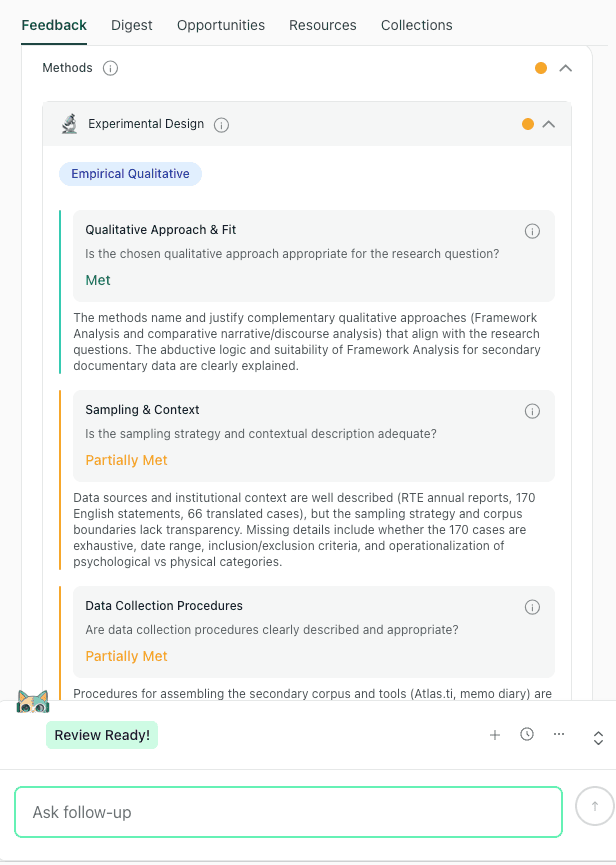
Methods feedback in thesify can help identify whether the draft explains qualitative approach, sampling context, and data collection procedures clearly.
If the methods section still feels difficult to organize, Methods Section Feedback in thesify can help you check whether the draft communicates the research design, procedures, analysis transparency, and replicability clearly for academic readers.
Transcription Software for Qualitative Research Interviews
Transcription software for qualitative research should be selected according to method, data sensitivity, audio quality, language context, and review time. Because transcription turns spoken interaction into written research material, transcript quality affects coding, quotation selection, anonymization, and interpretation.
Tool Type | Example Tools | Best For | What to Check |
Automated transcription | Fast first drafts from clear audio | Accent accuracy, speaker labels, data retention | |
Human transcription | Rev, academic transcribers | Sensitive, multilingual, or complex interviews | Confidentiality agreement, turnaround time |
Local transcription | Whisper installed locally | Confidential or restricted data | Technical setup, machine capacity, manual review |
Built-in transcription | Convenience within an existing workflow | Storage location, export format |
Automated Transcription for Fast First Drafts
Automated transcription works best when the recording is clear, speakers are separated, and the analysis does not depend on fine-grained interactional detail. Tools such as Otter, Sonix, and Trint can shorten the time between fieldwork and coding, especially when you are working across several interviews on a compressed timeline.
Use automated transcription when:
The audio is clear.
Speakers do not overlap heavily.
The project uses broad thematic or content analysis.
The data has been approved for cloud processing.
You have time to review the transcript before coding.
Check the transcript before importing it into your coding workflow. Names, technical terms, places, organizations, timestamps, and speaker labels need particular attention. Guidance on anonymising qualitative data notes that names, companies, birth dates, addresses, educational institutions, countries, and other capitalized terms can be disclosive, which makes transcript review part of privacy protection as well as quality control.
Human Transcription for Sensitive or Language-Level Analysis
Human transcription is usually the stronger choice when the audio contains overlapping speech, multiple speakers, accented speech, multilingual code-switching, specialist terminology, or sensitive participant accounts. It is also better suited to discourse analysis, conversation analysis, and other approaches where pauses, interruptions, hesitations, tone, and interactional sequence shape interpretation.
Use human transcription when:
The interview contains sensitive or identifiable material.
The recording includes overlapping speech.
The analysis depends on pauses, interruptions, emphasis, or sequence.
The project involves clinical, legal, or vulnerable-population data.
The transcript needs higher reliability before coding or quotation.
For professional services, check the confidentiality terms, secure transfer process, data retention policy, and compliance documentation before uploading audio. For example, Rev states that HIPAA compliance is available through a specific subscription plan, while its enterprise security page describes HIPAA-compliant transcription services for sensitive healthcare data.
Local Transcription for Confidential Data
Local transcription can be useful when ethics approval, institutional policy, or participant sensitivity limits cloud-based transcription. Whisper is an open-source speech recognition system that can be run locally with the right technical setup, which gives researchers more control over where audio files are processed.
Use local transcription when:
Audio files should remain inside a restricted research environment.
Cloud processing is not approved.
The project involves unpublished or sensitive participant material.
You have the technical support to install, run, and review the output.
Local transcription still requires careful checking. Whisper and similar systems can produce errors, including inaccurate wording, missing context, and unstable punctuation. No machine transcript should move into coding, quotation, or publication without human review.
CAQDAS Software for Coding and Qualitative Data Analysis
CAQDAS software, or computer-assisted qualitative data analysis software, helps you code, organize, retrieve, compare, and document qualitative material. It provides structure for analysis through codebooks, memos, queries, matrices, visualizations, and exports. The software organizes the analytic record; you decide what the material means and how far the evidence supports each claim.
Choosing the best qualitative data analysis software in 2026 depends on project scale, data type, collaboration needs, institutional access, and the level of documentation required for publication or reporting. For example, the University of Surrey’s CAQDAS resources frame software selection around methodological and practical fit, including the type of project, the type of data, and the way researchers plan to work with the software.
NVivo, ATLAS.ti, and MAXQDA for Large or Complex Projects
NVivo, ATLAS.ti, and MAXQDA are usually most relevant when you need a durable analysis environment for a larger or more complex project. These tools can help you manage multiple data types, structured codebooks, team workflows, queries, memos, and visual outputs.
Tool | Strongest Fit | Watch For | Best Research Scenario |
Large datasets, multiple data sources, complex coding, queries | Learning curve, licence access, project portability | Multi-year qualitative project or funded study | |
Mixed methods, matrix analysis, cross-case comparison | Cost, feature density, setup time | Interview data combined with survey or demographic variables | |
Visual networks, conceptual mapping, theory-building | Complexity for smaller projects | Grounded theory, conceptual analysis, or visually oriented coding |
NVivo is a strong fit when you need to keep multiple data sources in one project. Lumivero describes NVivo as supporting qualitative analysis of textual and audiovisual data, with functions for coding, attributes, notes, queries, search, visualization, and sharing data and results.
MAXQDA is useful when your project combines qualitative coding with mixed-methods analysis. MAXQDA’s official materials describe it as software for qualitative and mixed-methods data analysis, with tools for organizing, analyzing, visualizing, and presenting data across a range of data types.
ATLAS.ti is useful when you want to visualize relationships across codes, data segments, and concepts. Its official materials emphasize network visualizations, word clouds, Sankey diagrams, and other visual formats for identifying themes and patterns in qualitative data.
Delve, Dedoose, Quirkos, and Taguette for Smaller or Faster Projects
Lighter qualitative coding software can be a better fit when your project is smaller, mostly text-based, time-limited, or unfunded. These tools can also suit focused article projects where you need coding, memoing, and export functions without building a large CAQDAS infrastructure.
Use this comparison as a starting point:
Tool | Best Fit | What to Check |
Focused thematic coding and a lower-friction coding interface | Export options, team workflow, AI features | |
Collaborative and mixed-methods projects in a browser-based environment | Subscription model, access controls, data storage | |
Visual coding, teaching, and smaller text-based projects | Limits for complex code hierarchies or large corpora | |
Free, open-source, text-based coding | Advanced query limits, hosting, collaboration setup |
Delve can fit focused text-based coding workflows where the priority is a lighter interface and faster setup. Check export options, collaboration features, and AI settings before committing a full project to the platform.
Dedoose can fit collaborative qualitative and mixed-methods projects that require browser-based access, multiple data types, team coding, and visualization.
Quirkos can fit smaller text-based projects, teaching contexts, or visually oriented coding workflows where spatial grouping helps you inspect emerging patterns.
Taguette is a free, open-source option for text-based coding, excerpt tagging, and exportable project materials.
When a Spreadsheet Is Enough for Qualitative Coding
A spreadsheet can work well when your qualitative project is small, text-based, and managed by one primary analyst. Excel or Google Sheets can support early familiarization, pilot coding, a small article dataset, or a straightforward thematic coding process.
The limits become visible when you need stronger retrieval, a durable audit trail, multiple coders, complex code hierarchies, or support for non-textual data. At that point, CAQDAS software can make the analysis easier to inspect, extend, and report.
Spreadsheet Works If | Use CAQDAS If |
Dataset is small | Dataset is large or varied |
Codes are simple | Code hierarchy is complex |
One researcher is coding | Multiple coders are involved |
Data is text-based | Audio, video, images, or PDFs matter |
Retrieval needs are limited | Queries, matrices, or visual maps are needed |
Coding is exploratory or preliminary | The project needs a durable audit trail |
AI Tools for Qualitative Data Analysis, What to Use Carefully
AI tools for qualitative data analysis can support parts of the analytic workflow, especially transcription, retrieval, clustering, summarization, and comparison. Their value depends on how narrowly you define the task and how carefully you verify the output against the source material. A 2025 study on AI-assisted qualitative analysis found that AI can support human-led analysis, but researchers still need strong knowledge of the dataset and the qualitative process to identify gaps, redundancies, and weak interpretations.
Use AI where it improves retrieval, comparison, documentation, or quality checking without weakening your control over interpretation. AI qualitative research tools work best when they help you inspect the data more carefully, document decisions more clearly, or retrieve evidence more efficiently.
What AI Can Support in Qualitative Research
AI works best when the task is bounded, reviewable, and close to the source material. In qualitative research, that usually means using AI to organize, locate, compare, or test material you will interpret yourself.
Use AI tools for qualitative data analysis to support:
Draft transcription: Generate an initial transcript from audio, then correct names, technical terms, speaker labels, and ambiguous passages before coding.
Transcript search: Locate terms, phrases, participant references, or recurring expressions across a large corpus.
Excerpt retrieval: Pull together material linked to a working code so you can review the surrounding context.
Preliminary clustering: Group potentially related excerpts as a prompt for human review, not as a finalized theme structure.
Code suggestions: Identify recurring language or patterns that may deserve closer attention during codebook development.
Summary comparison: Compare high-level summaries of transcripts to decide where deeper reading is needed.
Evidence-link checking: Check whether a working claim has enough textual support across cases or participants.
Negative case review: Locate contradictory, deviant, or limiting cases that complicate an emerging interpretation.
Keep Qualitative Interpretation Under Researcher Control
AI coding qualitative data becomes methodologically risky when outputs start to stand in for analytic engagement. Qualitative interpretation depends on familiarity with the dataset, reflexive memoing, theoretical sensitivity, and attention to context. In reflexive thematic analysis, for example, the researcher’s interpretive work is central to the development and naming of themes.
Keep the following tasks under your control:
Transcript familiarization: Read and listen closely enough to understand participant context, not only extracted segments.
Reflexive memoing: Record how your assumptions, role, and analytic decisions shape interpretation.
Theme development: Define the conceptual meaning, boundaries, and evidentiary basis of each theme.
Theory-building: Connect descriptive patterns to the theoretical framework or conceptual contribution.
Contextual interpretation: Interpret contradiction, silence, emotion, uncertainty, and interactional context.
Final claims: Decide what the data allows you to argue, and where the limits of that argument sit.
Research integrity: Take responsibility for how AI was used, what it produced, and how its outputs were checked.
Methodological caution: AI-generated codes or themes may look orderly before they are analytically sound. Use AI outputs as prompts for review, comparison, and questioning before you decide what the material means.
This concern is central to our article on The Impact of Generative AI on Student Learning: Why the OECD Warns Against “Fast AI”: AI can create the appearance of progress while reducing the depth of reasoning when it shortcuts the thinking process. The writing stage raises a related risk: AI editing can flatten a draft by improving surface fluency while weakening conceptual precision.
A Slow AI Workflow for Qualitative Researchers
A Slow AI workflow uses AI for organization, comparison, retrieval, and verification while keeping interpretation with the researcher. This approach is especially useful when you are working with a large corpus, preparing a manuscript from coded material, or trying to identify where an emerging claim needs stronger evidentiary support.
Use this four-step workflow:
Use AI to organize, retrieve, or compare. Assign the tool a specific task, such as locating excerpts, comparing summaries, or checking whether a claim appears across cases.
Check the output against source material. Return to the transcript, field note, or excerpt before accepting a summary, cluster, or suggested code.
Write or revise the interpretation yourself. Define the theme, theoretical meaning, and analytical claim in your own terms.
Document what AI supported. Keep a record of the tool, task, prompt or workflow, output reviewed, and decision made by the research team.
This kind of workflow aligns with a Socratic Writing Workflow, which uses AI to support questioning, verification, and revision instead of one-shot output.
Data Privacy, Consent, and Participant Protection in Qualitative Research Tools
Qualitative research data privacy should be assessed before transcripts, recordings, field notes, or coded excerpts enter any platform. Before uploading participant material, confirm that the tool matches your consent materials, ethics approval, data management plan, and future publication needs.
Plan for de-identification, consent, controlled access, and future data use when human participant data may be shared or reused. For qualitative research, these decisions affect the entire workflow, from recording and transcription to coding, excerpt selection, archiving, and manuscript preparation.
What to Check Before Uploading Interview Data to Qualitative Research Tools
Before uploading interview data, assess how the tool stores, processes, shares, and exports participant material. This applies to transcription platforms, CAQDAS software, AI-supported analysis tools, cloud storage, and collaborative workspaces.
Privacy Check | Ask Before Use | Why It Matters |
Cloud storage | Does the tool store files in the cloud? | Cloud storage may affect institutional approval and access control |
Server location | Where are the servers located? | Data residency may matter for GDPR, institutional policy, or funder requirements |
Encryption | Is data encrypted in transit and at rest? | Encryption reduces exposure during storage and transfer |
Retention and deletion | Can files be permanently deleted? | Retention rules affect long-term control over participant data |
AI processing | Does the provider use uploaded material for model training or product improvement? | Uploaded transcripts may be processed, stored, or reused in ways that affect consent and confidentiality |
AI settings | Can AI features be turned off? | Some projects may allow transcription but prohibit AI-supported analysis |
Collaborator access | Can access be restricted by role? | Team projects need clear permission boundaries |
Export formats | Can you export transcripts, codes, memos, and reports in usable formats? | Exportability protects future analysis, archiving, and publication workflows |
Consent coverage | Does the consent form cover transcription, third-party tools, and AI-supported processing? | Consent must match the actual data handling workflow |
Identifier separation | Can identifiers be separated from analytic material? | Separation reduces re-identification risk during coding and writing |
How to Handle Sensitive or Identifiable Qualitative Data
Sensitive qualitative data often becomes identifiable through combinations of details, even after direct names are removed. When anonymising qualitative data, plan for direct and indirect identifiers, including combinations of details that can become disclosive.
Use a de-identification workflow that protects both the raw data and the analytic record:
Store signed consent forms separately from transcripts, recordings, field notes, and coded excerpts.
Separate direct identifiers from analytic files as early as possible.
Use pseudonyms consistently across transcripts, memos, codebooks, and draft excerpts.
Remove or generalize names, locations, institutions, workplaces, rare roles, and distinctive biographical details.
Review contextual details in quotations before using them in manuscripts, reports, or presentations.
Check provider terms before uploading sensitive or unpublished participant data to AI-supported tools.
Keep a secure log of anonymization decisions, especially when several team members are coding or editing the same corpus.
Why Exportability Matters for Peer Review and Archiving
Qualitative research audit trails help make the movement from data to findings traceable. You may need to show how codes developed, why certain excerpts were selected, how themes changed, or how disagreements were handled within the research team. That record becomes useful during co-author review, grant reporting, peer review, data archiving, and later secondary analysis.
Exportability also protects the project from software lock-in. The REFI-QDA standard was developed to support exchange between qualitative data analysis programs, including codebook and project exchange. DANS notes that QDPX and QDPC are preferred formats for long-term access to projects and codebooks created in QDA software.
At minimum, confirm whether your tool can export:
Raw transcripts
Cleaned or anonymized transcripts
Codebooks
Coded excerpts
Memos
Reports
Visual maps
Search results
Team annotations
Version histories, where available
These records also support the writing stage. When you describe data collection, anonymization, coding, and analysis in a manuscript, your methods section needs to make the workflow legible to academic readers. Methods Section Feedback in thesify can help you check whether those design, procedure, and analysis decisions are clearly communicated in the draft.
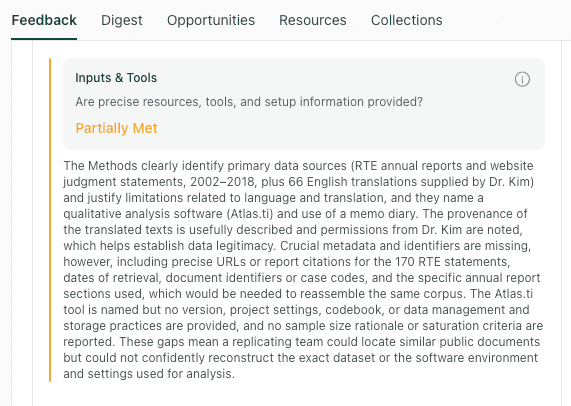
thesify feedback can help researchers check whether a methods section clearly reports the tools, sources, setup details, and documentation needed to make a qualitative workflow understandable to academic readers.
From Coded Data to Defensible Qualitative Writing
Qualitative research writing begins when coded material becomes an argument. A code report, excerpt table, or network map can help you retrieve and inspect material, but the manuscript still needs a clear evidentiary progression from analytic categories to claims. In thematic analysis, theme development moves from detailed codes and categories toward more abstract interpretation, with themes linking the data back to the research question.
Use this progression to structure the writing stage:
Codes → Categories → Themes → Claims → Evidence → Manuscript Sections
This sequence helps you keep the manuscript anchored in the analysis rather than the software output. It also gives you a practical way to check whether each finding has a clear conceptual role, enough supporting evidence, and an explicit connection to the research question.
Turn Coding Output Into an Academic Argument
Qualitative analysis writing becomes weak when the draft reports the coding structure while leaving the analytical meaning underdeveloped. Frequency can be useful, but frequency alone gives an incomplete basis for judging significance. A theme needs patterned meaning, conceptual boundaries, and relevance to the research question.
Common problems in qualitative findings sections include:
Listing themes without showing their conceptual hierarchy.
Moving from one participant quotation to the next with limited interpretation.
Treating code frequency as the main basis for significance.
Using quotations where the draft needs analysis.
Making claims that exceed the available evidence.
Losing the link between methods, findings, and discussion.
Reporting software outputs while leaving the analytic contribution unclear.
If your draft reads like a sequence of summaries, our guide to fixing weak analysis patterns in academic writing can help you rebuild the section around claims, evidence, and interpretation. This matters most when coded excerpts have entered the draft, but the analysis still needs to explain why the evidence matters.
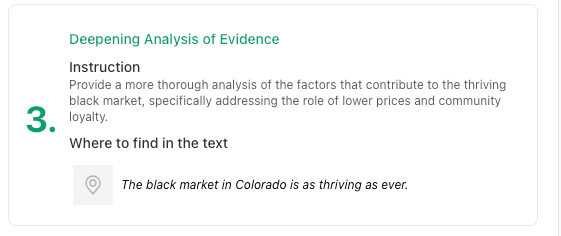
A qualitative findings section needs to move beyond relevant excerpts. thesify feedback can point to places where the draft needs deeper analysis of the evidence.
How to Move From Codes to Themes to Claims
Moving from codes to themes requires active synthesis. The work is partly organizational, but the decisive step is interpretive: you need to explain what a pattern means, how far the evidence supports it, and why it matters for the research question.
Use this workflow after exporting or reviewing your coded material:
Review code clusters. Group related codes and identify the analytic question each cluster raises.
Write a memo for each possible theme. Use the memo to test what the cluster explains beyond description.
Define what each theme explains. Set boundaries around what belongs inside the theme and what sits outside it.
Select the strongest supporting excerpts. Choose quotations that demonstrate the claim, including nuance or variation.
Identify contradictions, exceptions, or limits. Look for cases that refine, complicate, or narrow the interpretation.
Convert the theme into an analytical claim. Write a declarative sentence that states what the theme reveals.
Check whether the claim answers the research question. Revise claims that remain descriptive, diffuse, or only loosely connected to the study aim.
Place the claim in the right manuscript section. Decide whether it belongs in the Findings, Results, Discussion, or an integrated chapter.
After mapping your claims, run an integration pass across the manuscript to check whether terms, evidence, and audience assumptions remain consistent across sections.
How thesify Fits Into the Post-Analysis Revision Stage
Use thesify after you have completed coding, interpretation, and an initial draft of your qualitative findings. At this stage, the revision task shifts from analysis management to manuscript clarity: your methods, evidence, claims, and discussion need to be legible to co-authors, PIs, editors, reviewers, or examiners.
Revision Question | Relevant thesify Resource |
Have you explained the research design, sampling, procedures, and analysis process clearly? | |
Does the evidence support the findings without blurring description and interpretation? | |
Do the interpretations stay aligned with the findings and avoid overclaiming? | |
Are co-author edits preserving the central argument across the manuscript? | How to Co-Author an Academic Paper Without Losing the Argument |
Academic writing feedback is most helpful after the coded data and memos have formed the analytic foundation. At the revision stage, the task is to check whether your manuscript connects evidence, claims, methods, and limitations clearly enough for academic review.
After coding and synthesis, thesify can help you review whether the manuscript connects evidence to claims clearly enough for co-authors, reviewers, or editors.
Recommended Qualitative Research Tool Stacks by Project Type
Choose the stack according to the project in front of you: the corpus size, data sensitivity, collaborator structure, expected outputs, and writing stage. Use the table below to match qualitative research tools to common academic project scenarios.
Project Type | Suggested Tool Stack | Why It Fits |
Single-article interview study | Automated or human transcription, Taguette or Delve, Zotero, Word or Google Docs | Keeps the workflow lean while supporting coding, memoing, and article drafting |
Postdoctoral or fellowship pilot project | Secure recording setup, Sonix or human transcription, Quirkos or MAXQDA, Zotero, shared storage | Gives you enough structure to test themes, document decisions, and develop follow-up publications |
Funded mixed-methods project | Qualtrics or REDCap, MAXQDA or Dedoose, Zotero, R/SPSS if needed, project management tool | Connects qualitative material with survey, demographic, clinical, or institutional variables |
Collaborative qualitative research team | Dedoose or Dovetail , shared drive, access-controlled storage, project management tool, co-author agreement | Supports team coding, shared documentation, and clearer responsibility across collaborators |
Sensitive clinical or ethnographic data | Offline or restricted recording, local transcription, encrypted storage, restricted CAQDAS access | Keeps identifiable material under tighter control and reduces unnecessary data exposure |
Journal article from existing coded data | CAQDAS exports, codebook, memos, Word or Overleaf, thesify, co-author review workflow | Focuses on synthesis, claim structure, and revision rather than new data management |
Long-form manuscript or book project | Human or automated transcription, NVivo or MAXQDA, Zotero, thesify for draft review | Supports a longer audit trail and a writing workflow that may span multiple outputs |
If you are advising doctoral researchers or building a longer doctoral workflow, our guide to The Ultimate 2026 Tech Stack: The Best Tools for PhD Students offers a broader view of research, writing, and feedback software by project phase. In this article, the key point is narrower: choose a stack that supports the specific qualitative workflow in front of you, then revise it as the project moves from data collection to analysis, writing, and publication.
Qualitative Research Tool Selection Checklist
Use this qualitative research tools checklist before committing to a platform or importing research data. A strong tool should fit your method, protect participant material, support your analytic workflow, and leave you with usable records for writing, collaboration, and publication.
Methodological fit: Does the tool support your qualitative method, including coding, memoing, comparison, theme development, or mixed-methods analysis?
Data types: Can it handle the material you actually work with, such as interviews, PDFs, videos, images, field notes, documents, or open-ended survey responses?
Project scale: Is the dataset small enough for a spreadsheet, or does it require dedicated qualitative data analysis software?
Analytic structure: Do you need code hierarchies, memos, matrices, visualization, team coding, or advanced retrieval?
Export options: Can you export transcripts, codebooks, coded excerpts, memos, reports, and visual outputs in usable formats?
Institutional access: Does your university, research institute, funder, or project already provide access to a specific platform?
Long-term access: Will you still be able to access the project after a contract, grant, fellowship, or institutional appointment ends?
Collaboration: Can co-authors, research assistants, or multiple coders work in the same project with appropriate permissions?
Data privacy: Does the platform retain your data, process it through third-party systems, or use it for AI model training?
Consent coverage: Does your ethics approval and participant consent form cover recording, transcription, storage, AI-supported processing, and collaboration?
Audit trail: Can you document coding decisions, memo development, theme revisions, and evidence selection?
Writing stage: Does the tool support the move from coding to qualitative research writing, or will you need a separate workflow for synthesis, drafting, and revision?
FAQs About Qualitative Research Tools
What Are the Best Qualitative Research Tools in 2026?
The best qualitative research tools in 2026 depend on method, dataset size, budget, privacy needs, and writing goals. NVivo, MAXQDA, and ATLAS.ti fit complex academic projects. Delve, Dedoose, Quirkos, and Taguette fit smaller projects, lighter coding workflows, or lower-cost research setups.
What Is CAQDAS?
Computer-assisted qualitative data analysis software (CAQDAS) provides the digital infrastructure to organize, code, retrieve, compare, and document your research. These platforms handle everything from interview transcripts and focus group recordings to field notes, PDFs, images, videos, and open-ended survey responses.
Do I Need NVivo for Qualitative Research?
NVivo is useful when your project involves a large corpus, multiple data types, complex code hierarchies, team coding, or institutional access to the software. Smaller qualitative projects may work better with MAXQDA, ATLAS.ti, Dedoose, Delve, Quirkos, Taguette, or a structured spreadsheet.
What Is the Easiest Qualitative Research Software to Learn?
The easiest qualitative research software is usually a focused tool with a lighter interface. Delve, Quirkos, Dedoose, and Taguette may be easier to start with than feature-dense CAQDAS platforms. The right choice depends on collaboration needs, mixed-methods requirements, visualization, export options, and coding complexity.
Can AI Code Qualitative Data?
AI can suggest codes, cluster excerpts, summarize transcripts, retrieve patterns, and support comparison across a dataset. Human interpretation remains responsible for theme development, theoretical framing, reflexive judgment, and final claims. Use AI coding qualitative data workflows only when outputs can be checked against source material.
What Free Qualitative Research Software Can Researchers Use?
Accessible options for early-career researchers include spreadsheets, Taguette, Zotero, Google Docs, Obsidian, and open-source transcription workflows. These free qualitative research tools support small projects and early coding stages effectively without draining your budget.
How Do I Protect Participant Data When Using Qualitative Research Tools?
Protect participant data by using secure storage, restricted access, anonymized transcripts, and clear consent language. Before uploading data, check retention rules, server location, encryption, export options, and AI model-training policies. Upload sensitive qualitative data to public AI tools only when your ethics approval, consent materials, and institutional policy explicitly allow that workflow.
Conclusion: Build a Qualitative Research Workflow That Preserves Interpretation
The best tools for qualitative researchers keep you close to the material while making the research process easier to document, review, and revise. A strong qualitative research workflow should fit your method, protect participant data, preserve analytic decisions, and support the movement from coded material to written claims. Transcription software can reduce manual workload, CAQDAS can organize codebooks and memos, and AI tools can support retrieval, clustering, or evidence checking. Interpretation, theory-building, and final claims remain your responsibility.
The manuscript is where the workflow has to become legible to other academic readers. Your draft needs to communicate how the data was collected, how analysis developed, which evidence supports each claim, and where the limits of interpretation sit. Once your coding and synthesis are complete, thesify can help you review whether the written draft communicates your methods, evidence, and claims clearly before it moves to a co-author, PI, editor, reviewer, or journal.
Review Your Qualitative Draft With thesify
After completing your qualitative analysis, use thesify to check whether your draft presents the method, evidence, and claims with enough clarity for academic review. You can sign up for free and use structured feedback to guide your next revision.
Related Posts
AI Tools for Early Career Researchers (2026): The landscape of academic technology has evolved. While earlier iterations of artificial intelligence focused heavily on generic text generation, language polishing, and basic grammar checking, the most critical AI tools for early career researchers in 2026 focus on workflow optimization, compliance, and strategic auditing. Discover 2026's best ethical AI tools for early career researchers. Master grant writing, survive peer review, and protect IP with our slow AI guide.
Improve Your Analysis: From Descriptive to Analytical Writing: Recognizing weak analysis patterns is a fundamental requirement of structural revision. At the university and research level, inadequate analysis rarely stems from a lack of research or poor grammar. Instead, it manifests as intellectual shortcuts—instances where the writer presents information but abandons the responsibility of interpreting it. This halts the logical progression of the paper and forces the reader to infer the significance of the data on their own. Learn how to identify and fix weak analysis patterns in academic writing. This guide shows practical revisions, examples and subtle tips using thesify’s feedback tool.
Methods Section Feedback Rubric: What thesify Checks: Get methods section feedback in thesify. Use rubric scores to tighten design, sampling, procedures, and analysis transparency for review, then revise and re-run. When you run methods section feedback in thesify, the output is rubric-based and Methods-specific. It is designed to surface reporting gaps that routinely show up in methods section peer review comments, particularly where readers need more information to evaluate decisions, interpret results, or replicate procedures.