Introducing In-Depth Methods, Results, and Discussion Feedback in thesify

Peer reviewers often focus first on your Methods, Results, and Discussion. Missing endpoints, incomplete statistical reporting, or conclusions that outpace the evidence can trigger avoidable revision requests.
New in thesify: you can now get in-depth, section-level feedback on each of these sections. thesify’s feedback now flags common reviewer concerns and gives concrete revision guidance, for example what to clarify in your Methods, what to report in your Results, and how to calibrate claims and limitations in your Discussion.
This update makes thesify one of the first AI pre-submission feedback tools that targets the same three sections reviewers read first: Methods, Results, and Discussion.
This article explains what thesify’s new section-level feedback checks, the types of issues it identifies, and a practical workflow for using it before journal submission.

How Section-Level Feedback Targets Reviewer Expectations
Reviewers tend to judge a manuscript’s credibility through the same three core sections. Writing guidance consistently emphasizes that your Methods should include enough information for replication and to let readers judge the validity of your conclusions. The Results should present findings in a logical sequence without bias or interpretation. The Discussion should interpret what you have already reported, avoid inflated claims, and explain limitations in a way that clarifies what your findings can, and cannot, support.
This is the structure thesify’s new section-level feedback follows. Instead of giving broad manuscript comments, it evaluates each section against common reviewer checks and then provides concrete revision guidance.
New section-level feedback for scientific papers in thesify is organized by manuscript section so you can revise in the same way reviewers read. Instead of broad, general comments, thesify breaks feedback into targeted checks and actionable suggestions.
Here are the new feedback items you’ll see in the feedback panel or on your downloadable thesify feedback report:
Methods: checks for experimental design, detail and replicability, and research question alignment
Results: prompts to keep reporting descriptive and statistically complete
Discussion: flags overclaiming and helps you link interpretation to evidence and limitations
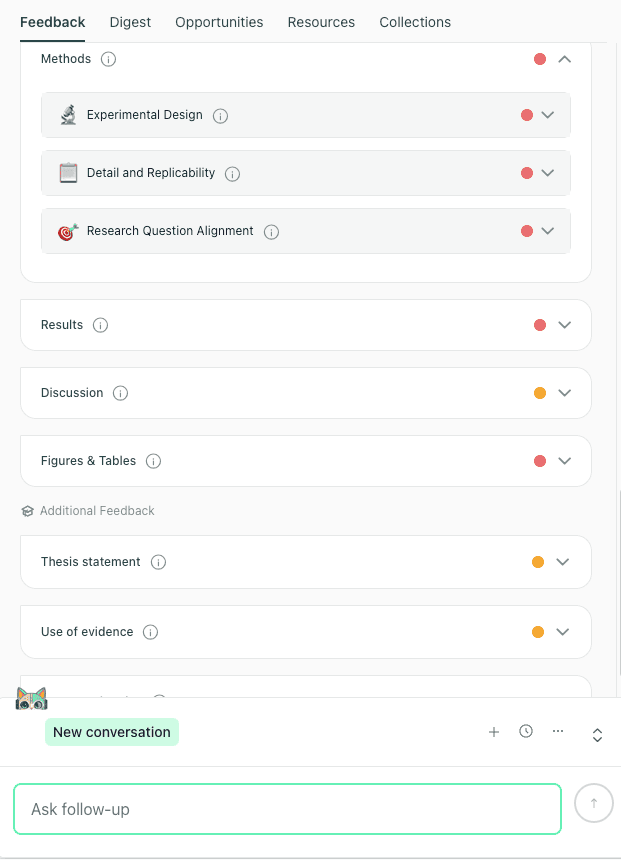
New in thesify: section-level feedback tabs for Methods, Results, and Discussion, with Methods checks grouped by design, replicability, and alignment.
Next, we’ll start with the Methods tab, where section-level feedback commonly identifies design and replicability gaps that are difficult to fix late in the submission process.
If you are still deciding where to submit, thesify’s Journal Finder can help you shortlist journals before you run pre-submission checks.
Methods Section Feedback: Design and Replicability Checks
The Methods section is often where reviewers decide whether your study is reproducible and whether your analytic choices support your claims. Effective methods section feedback therefore has to be concrete, section-specific, and actionable.
That is the point of thesify’s new section-level Methods feedback: you get structured checks (with clear status labels like Partially Met and Not Met) plus concrete revision prompts you can apply immediately.
In thesify, Methods feedback is organized into three areas that map to common reviewer concerns:
Experimental Design: design fit, sampling, comparators, bias control, endpoints, and analysis plan
Detail and Replicability: step-by-step procedures, tools, parameters, and what another team would need to reproduce your workflow
Research Question Alignment: whether your stated research question is actually operationalized by your variables, scoring rules, and decision criteria
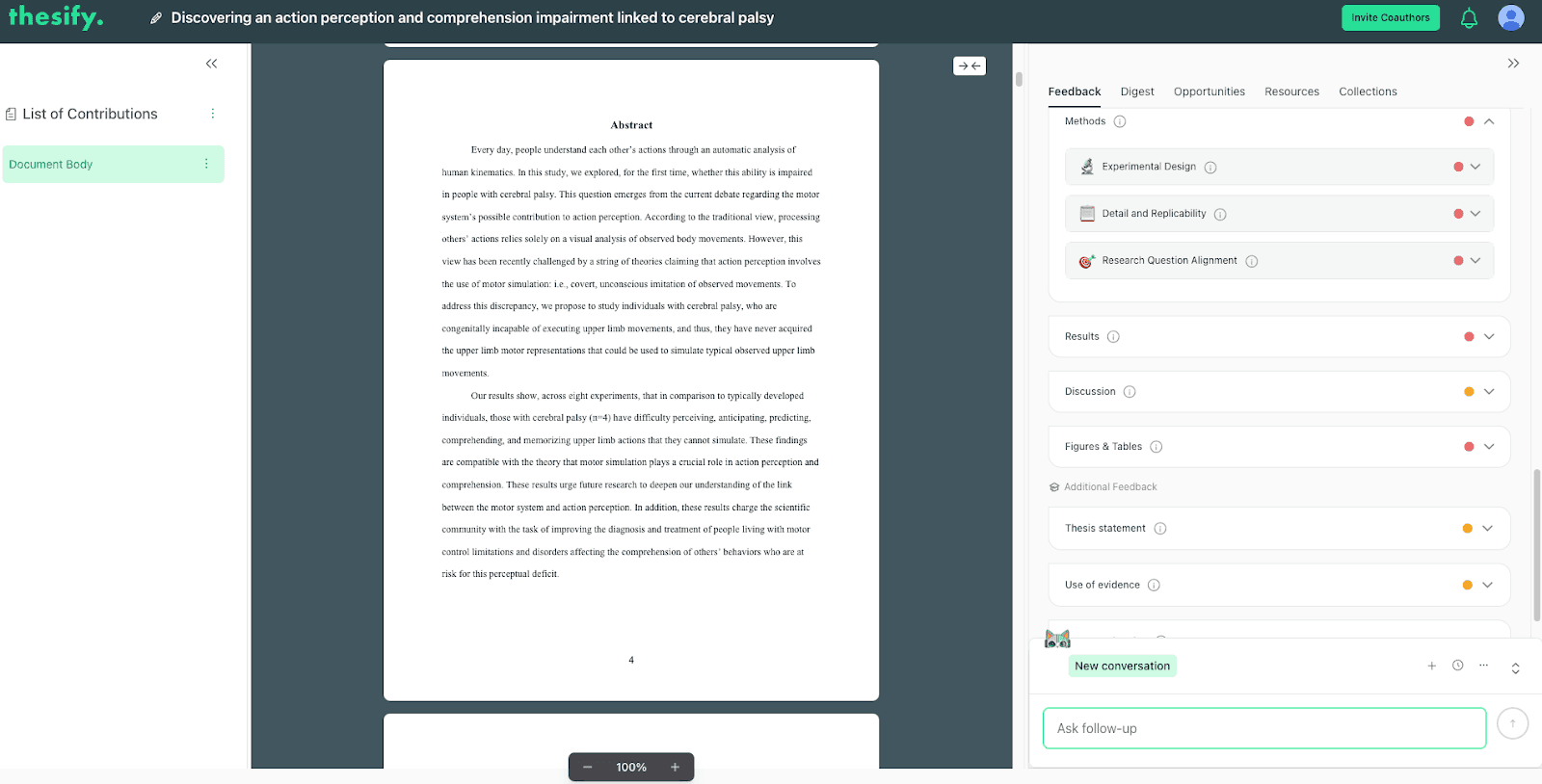
Example of thesify’s Methods feedback: rubric-style checks that identify design fit and sampling gaps, then explain what to clarify.
Experimental Design: Make the Endpoint and Comparison Logic Explicit
One of the most common reasons Methods sections get flagged is that the design is described, but the inferential logic is not executable. In a quantitative scientific paper, thesify may flag issues such as:
No clearly stated primary endpoint tied to the hypothesis
Sampling and recruitment not reported, and inclusion or exclusion criteria left implicit
Comparator subsets used, but not defined or documented
Key bias controls not described (for example, randomization, counterbalancing, blinding, independent scoring)
No analysis plan for covariates, missing or incomplete task data, or multiple-comparison control
thesify’s feedback does not stop at “this is unclear.” It converts the gap into a revision instruction suggestions that you can paste into a revision plan for your Methods section.
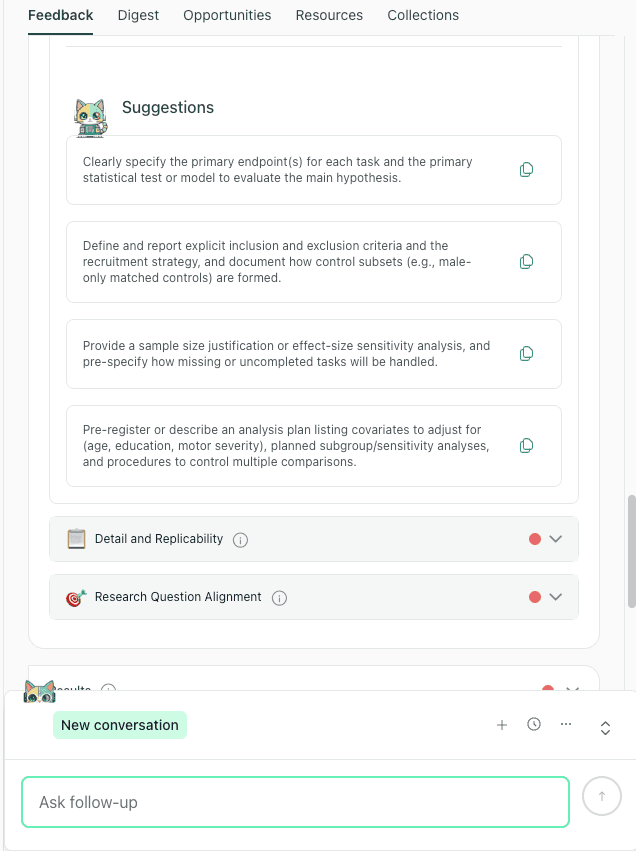
Example suggestions from thesify’s Methods feedback: define primary endpoints, document recruitment and comparators, and specify missing data and multiple comparisons handling.
What to revise (copy-friendly checklist):
Add a short Endpoints and Analysis Plan subsection that states:
primary endpoint(s) and secondary endpoints
primary test or model for each hypothesis
planned covariates and adjustment strategy
missing or incomplete data handling rule
multiple-comparison control (if applicable)
Add 2–4 sentences that formalize:
inclusion and exclusion criteria
recruitment strategy
how comparator groups and subsets are formed
Detail and Replicability: Reduce “Email the Author” Points
A Methods section can sound thorough while still being difficult to reproduce. This is something thesify’s feedback is able to point out in both qualitative and quantitative designs:
Qualitative example patterns thesify flags:
Sampling frame described, but selection criteria and distribution details unclear
Analytic approach named, but operational coding detail missing (code definitions, inclusion rules, charting steps)
Credibility procedures missing or underspecified (for example, double-coding, peer debriefing, audit trail)
Translation checks acknowledged as a limitation, but not systematized as a procedure
Quantitative example patterns thesify flags:
Step-by-step experimental workflow not executable (trial counts, timing parameters, algorithm steps, practice trials)
Randomization or counterbalancing not documented
Scoring and coding procedures unclear (who scored, how ambiguous responses were classified, interrater reliability)
Tools are named, but key parameters needed for replication are absent (device details, software build, file formats, stimulus specs)
What to revise (so the Methods is reproducible):
Add the missing “operational layer,” not more narrative:
trial-level procedure details (counts, order rules, timing, exclusions)
scoring rules and decision criteria
who performed coding or scoring, and what consistency checks were used
Add a brief “Materials and Tools” block:
software name and version
settings or parameters that affect outputs
file formats and preparation steps
Add a clear “Data/Materials Access” statement:
repository link or request process for non-public artifacts
what exactly is shared (data, codebook, scripts, templates)
Research Question Alignment: Connect Your Question to Measures and Decision Rules
Your Methods section can describe tasks and samples clearly and still fail on alignment if your paper never defines how the research question is measured. thesify’s new feedback on Methods can flag if an “answerable path” is present but incomplete because the Methods does not define primary dependent measures, scoring rules, per-task sample sizes, or a prespecified analysis plan.
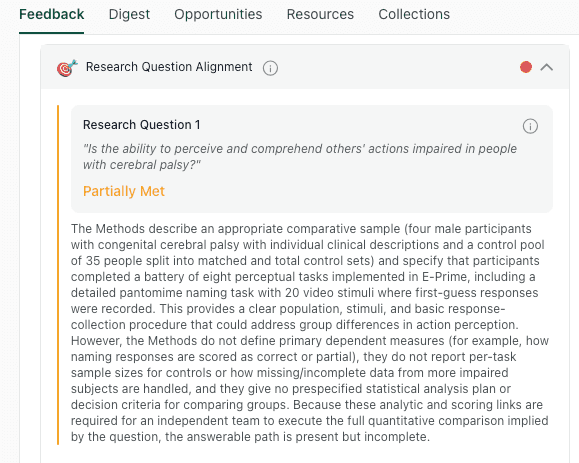
Example of thesify’s Research Question Alignment check: it identifies when measures and scoring rules are not yet specified enough to answer the stated question.
What to revise (alignment checklist):
Define the dependent measure(s) for each task or outcome
Specify scoring rules (including how ambiguous responses are coded)
Report per-task sample sizes and handling rules for incomplete participation
State the decision criteria for comparing groups (tests/models, alpha, corrections)
Methods Pre-Submission Checklist (Based on thesify’s Methods Feedback)
Use this checklist before you rerun your downloadable thesify feedback report:
Sampling frame and selection criteria are explicit
Inclusion and exclusion criteria are stated (not implied)
Comparator groups and subsets are formed transparently
Primary endpoint(s) are defined and tied to hypotheses
Statistical analysis plan is executable (tests/models, covariates, corrections)
Missing or incomplete data handling is prespecified
Bias controls are documented where relevant
Procedures are reproducible at an operational level (trial counts, timing, scoring rules)
Tools include versions and key parameters
Data, code, and materials access is clearly stated
Results Section Feedback: Descriptive Reporting and Statistical Transparency
New in thesify: you can now generate in-depth Results section feedback that targets the three areas reviewers typically scrutinize first:
How you present results
How clearly you state findings
Whether your statistical reporting is complete enough to evaluate.
If you are preparing a first submission or revising after reviewer comments, this is the part of the manuscript where small reporting choices often create disproportionate friction.
thesify’s Results feedback is structured to help you keep the Results section descriptive, transparent, and easy to audit, while still communicating a coherent narrative of what you found.
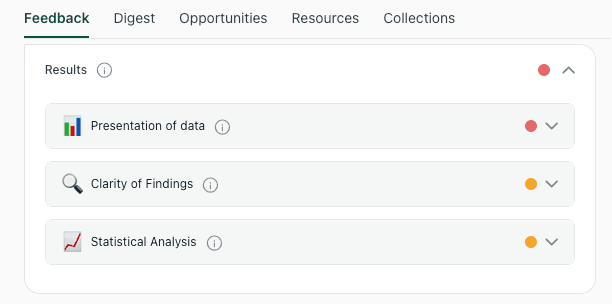
In thesify, Results feedback is organized into Presentation of Data, Clarity of Findings, and Statistical Analysis so you can revise systematically.
Presentation of Data: Make Figures and Tables Do More Work
In the Presentation of Data view, thesify’s Results feedback focuses on whether your text and visuals are doing distinct jobs. You will see comments when your Results paragraphs:
Repeat long sequences of numbers that are already visible in a figure or table
Cite a figure without stating what the reader should notice
Introduce secondary analyzes inside primary outcome paragraphs without signposting
The aim is simple: when you reference a table or figure, thesify prompts you to add one clear descriptive takeaway sentence (pattern, direction, approximate magnitude), then move on. This improves readability and reduces the impression that the Results are doing interpretive work.
Clarity of Findings: Lead with the Main Result Before the Details
In Clarity of Findings, thesify flags Results writing that buries the key outcome inside dense reporting. This often shows up when you present p-values or several descriptive statistics before the reader understands the direction and magnitude of the finding.
You can expect thesify to prompt you to:
Start each Results block with a single, plain-language summary sentence of the main finding
Keep subgroup or sensitivity analyzes in clearly signposted subsections
Edit ambiguous phrasing (for example hedging that reads like interpretation) so the Results remain strictly observational
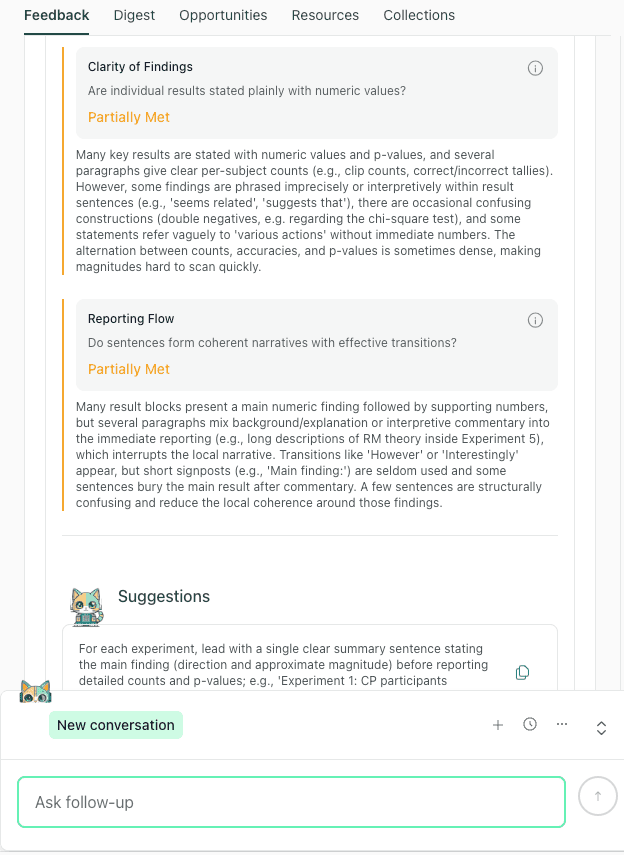
Clarity of Findings feedback helps you state the main result first, then present supporting statistics and details in a scannable sequence.
Statistical Analysis: Results Section Statistics Reporting That Holds Up in Peer Review
In the Statistical Analysis view, thesify’s AI Results feedback focuses on whether your results section statistics reporting is specific enough for a reviewer to follow, evaluate, and replicate. You will see feedback when reporting is incomplete or inconsistent, for example:
P-values shown without clear conventions (for example “0.00” rather than a threshold such as p < 0.001)
Missing links between the reported statistic and the comparison it supports
Absent details that readers rely on to interpret strength and precision, such as effect sizes or confidence intervals (when applicable)
Missing software or analysis environment details, which can matter for reproducibility
thesify’s prompts are geared toward making each primary comparison checkable in context, without turning the Results into a methods section.
thesify’s Results’ feedback is typically actionable: what to add, where to add it, and what to standardize so your reporting is consistent across experiments, outcomes, or thematic blocks.
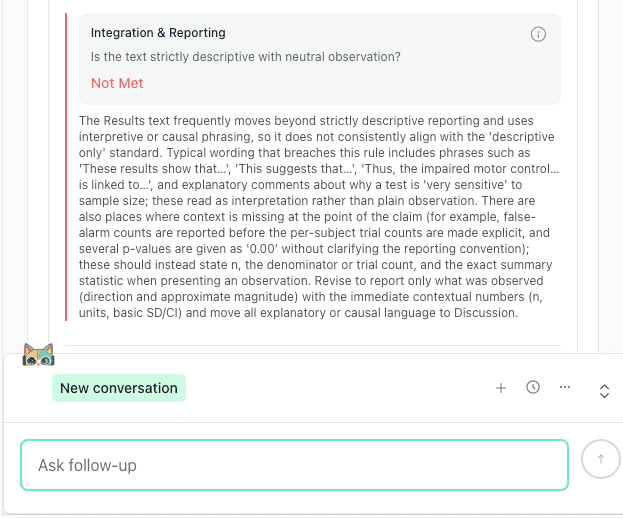
Statistical Analysis feedback highlights missing context (n, denominators, conventions) and prompts you to keep Results descriptive while standardizing reporting.
Quick Results Section Checklist (Before You Re-Run thesify)
Use this as a fast pass before regenerating your downloadable feedback report:
Each Results block opens with one sentence stating the main finding (direction and approximate magnitude)
Your Results language is descriptive, with mechanisms and explanations reserved for the Discussion
Every key statistic is paired with immediate context (n, denominator, comparison group)
P-values follow a consistent convention (avoid “0.00”)
Figures and tables are cited with one takeaway sentence, not a repeated list of values
Secondary analyses are clearly labelled and separated from primary outcomes
Finally, thesify’s discussion section overclaiming feedback helps you moderate claims and present limitations clearly, so your conclusions stay credible and reviewer-ready.
Discussion Section Feedback in thesify: Interpretation, Limitations, and Future Research
The Discussion is often where otherwise solid manuscripts lose precision. It is not usually because the argument is “wrong”, it is because the chain from results to interpretation to implications is not explicit enough for a critical reader.
New in thesify: you can now run section-level Discussion feedback that checks whether your interpretation stays faithful to your reported results, whether limitations are study-specific and method-linked, and whether future research directions are grounded and feasible.
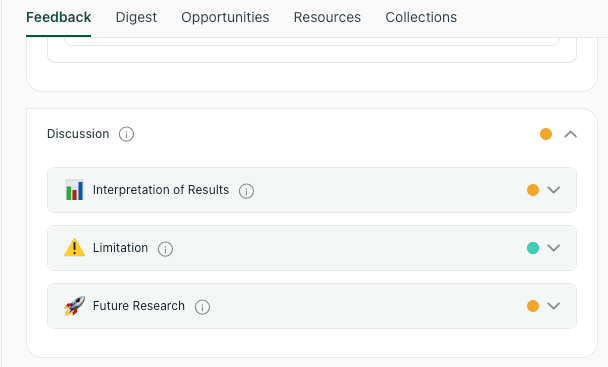
thesify breaks Discussion feedback into interpretation, limitations, and future research so you can revise each part with clear, targeted guidance.
Discussion Interpretation Feedback: Keep Claims Faithful to the Results
thesify’s interpretation of results feedback focuses on a core scholarly requirement, your Discussion should reflect what the Results actually establish. The feedback flags patterns that commonly weaken credibility in peer review, including interpretive claims that are not anchored to reported findings, causal or universal language that exceeds the design, and narratives that do not integrate null, mixed, or contradictory outcomes.
Practically, you can expect thesify’s feedback to help you:
Link each major interpretive claim to specific results, so readers can see exactly what supports what.
Calibrate strength of language, especially where results are mixed, borderline, subgrouped, or limited by small samples.
Integrate counterevidence and uncertainty into the argument instead of treating it as an afterthought.
Keep implications proportionate, framing broader conclusions as hypotheses when the evidence base is narrow.
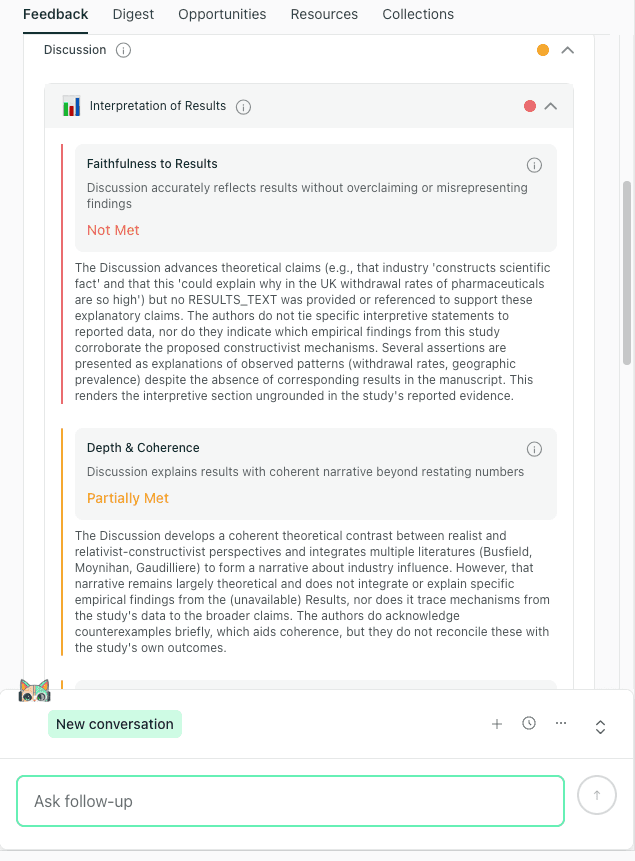
Interpretation feedback checks whether Discussion claims are evidence-linked, appropriately qualified, and consistent with the Results.
Discussion Limitations Feedback: Make Limitations Method-Linked and Consequence-Aware
Generic limitation paragraphs are easy to write and easy to dismiss. thesify’s limitations feedback is designed to push limitations into a more academically useful form: specific constraints that clearly arise from your Methods, and that explicitly state what those constraints do to inference.
The tool prompts you to strengthen limitations by:
Naming the constraint precisely, for example sampling restrictions, missing variables, measurement gaps, selection effects, or single-source data.
Connecting each limitation to a methodological choice or constraint, so the limitation is traceable rather than rhetorical.
Stating the impact on validity and interpretation, so readers understand what the limitation changes about generalizability, causal inference, or confidence in effect estimates.
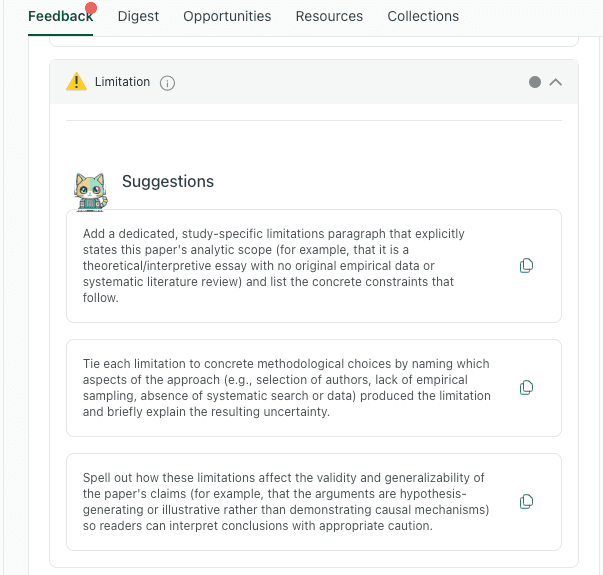
thesify’s Limitations feedback helps you move from generic caveats to study-specific constraints that are explicitly linked to Methods and interpreted consequences.
Discussion Future Research Feedback: Turn Next Steps Into Feasible Research Directions
thesify also now evaluates whether your future research section follows from your findings and limitations, and whether it is specified enough to sound credible. Reviewers tend to respond better to future work that is clearly motivated and operationally plausible, rather than aspirational lists.
In practice, thesify’s feedback helps you:
Ground each proposed direction in a specific result, limitation, or unresolved ambiguity.
Specify feasibility details, such as a plausible design direction, data source, comparison, or measurement strategy.
Prioritize directions, so the pathway forward reads like an agenda rather than a brainstorm.
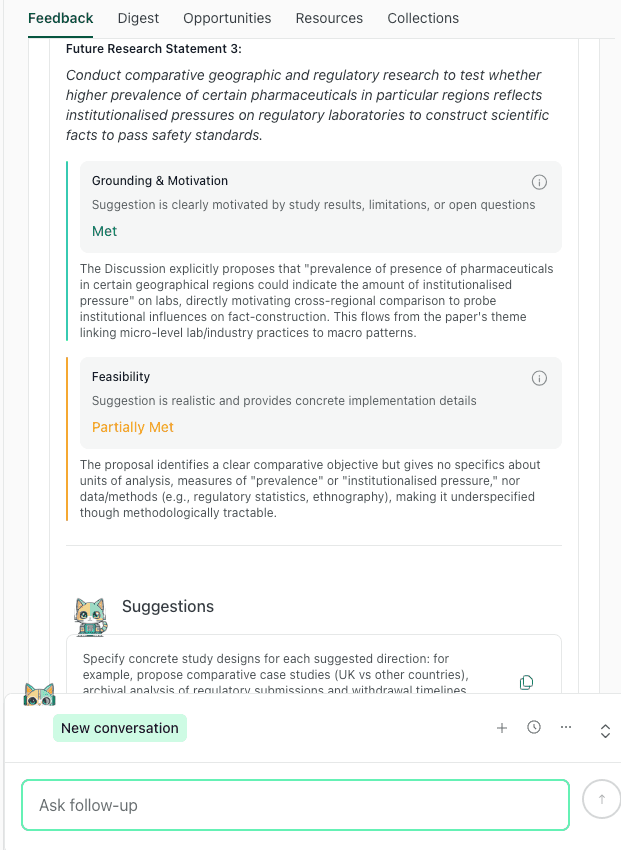
Future research feedback checks whether proposed next studies are motivated by the manuscript and described with enough detail to be actionable.
Quick Discussion Self-Check (Aligned with thesify’s Rubric)
Before you submit, run this pass after applying thesify’s discussion section feedback:
Interpretation
Each major claim is tied to a specific reported finding.
Language strength matches the design and results, especially where evidence is mixed.
Null or contradictory findings are acknowledged and incorporated.
Limitations
Limitations are study-specific, not generic.
Each limitation is linked to a Methods choice or constraint.
The limitation’s impact on validity or inference is stated plainly.
Future Research
Each direction is grounded in a result, limitation, or open question from the paper.
At least one concrete feasibility detail is provided.
Directions are prioritized, with a clear “next study” versus longer-term extensions.
How to Use thesify’s Section-Level Feedback Before Submission
Section-level feedback works best as a targeted revision loop. Run one section at a time, implement the highest-impact fixes, then re-run until the report is clean enough for submission.
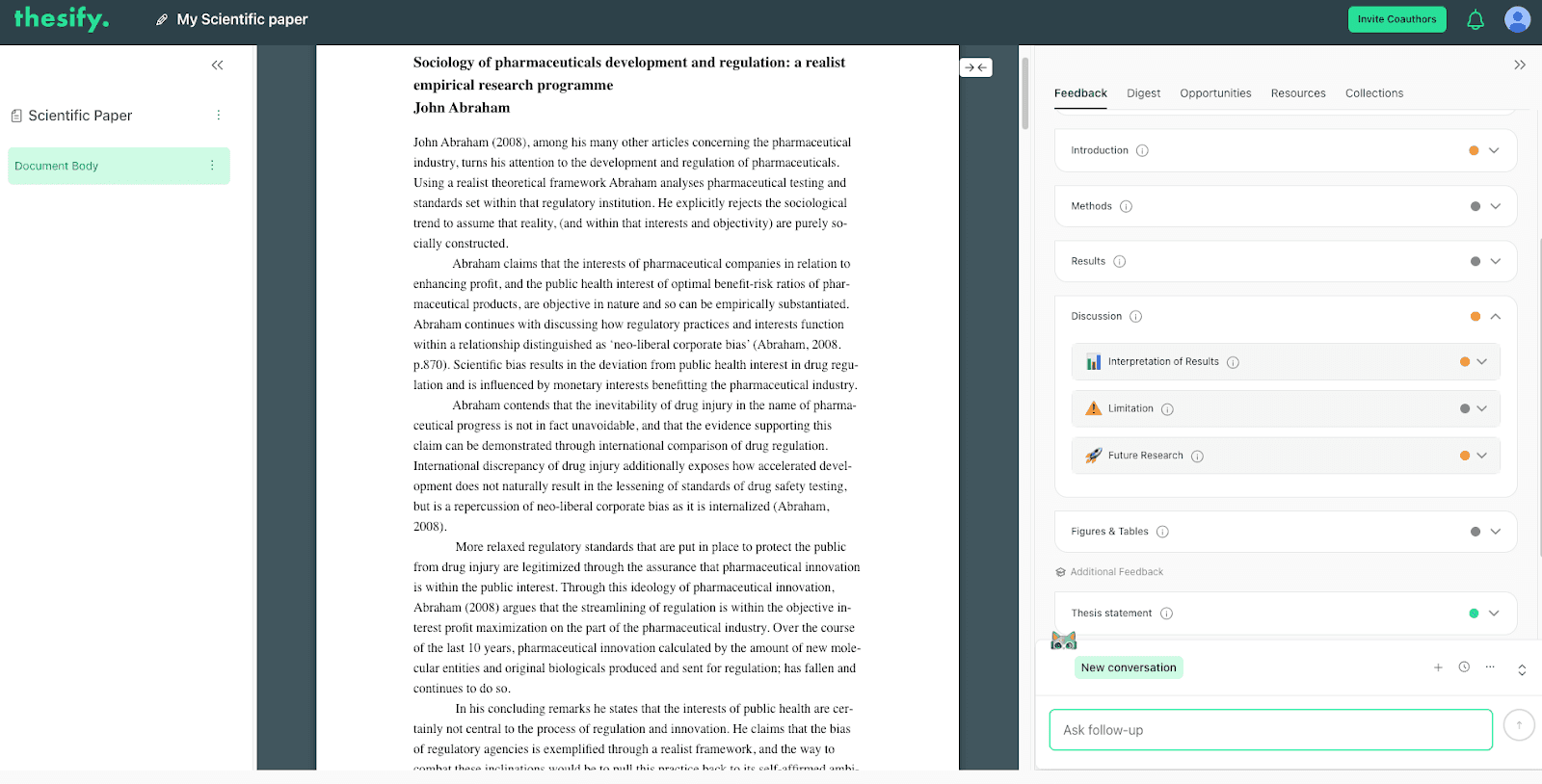
Section-level feedback in thesify evaluates Methods, Results, and Discussion separately, with focused rubrics and actionable suggestions..
In practice, this mirrors how reviewers read: Methods for replicability, Results for transparent reporting, then Discussion for calibrated interpretation.
Step 1: Run Section-Level Feedback on Your Draft
Open Feedback and run the report (choose the option that includes section-level feedback).
Use the section tabs to focus your revision pass, typically Methods, then Results, then Discussion.
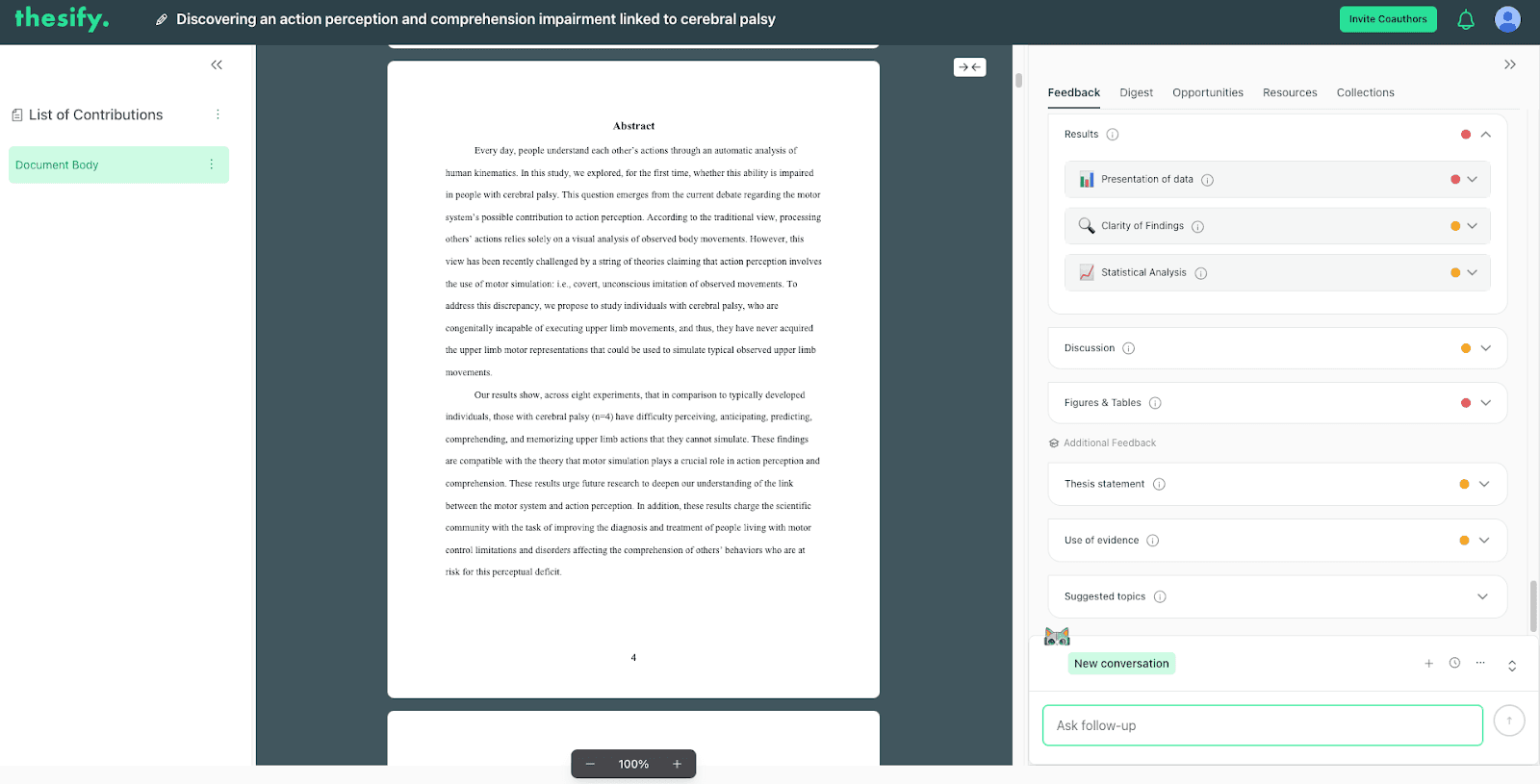
Navigate between Methods, Results, and Discussion to review section-specific feedback and actionable suggestions.
Step 2: Triage the Feedback, Fix What Blocks Credibility First
Within each section, prioritize changes that affect interpretability and reproducibility, before you spend time on stylistic refinement.
A practical triage order is:
Missing required reporting elements (sample sizes, definitions, test details, figure takeaways, limitations tied to design)
Structural issues (results blocks that bury the main finding, discussion claims not anchored to reported results)
Language calibration (interpretive or causal phrasing in Results, universal claims in Discussion)
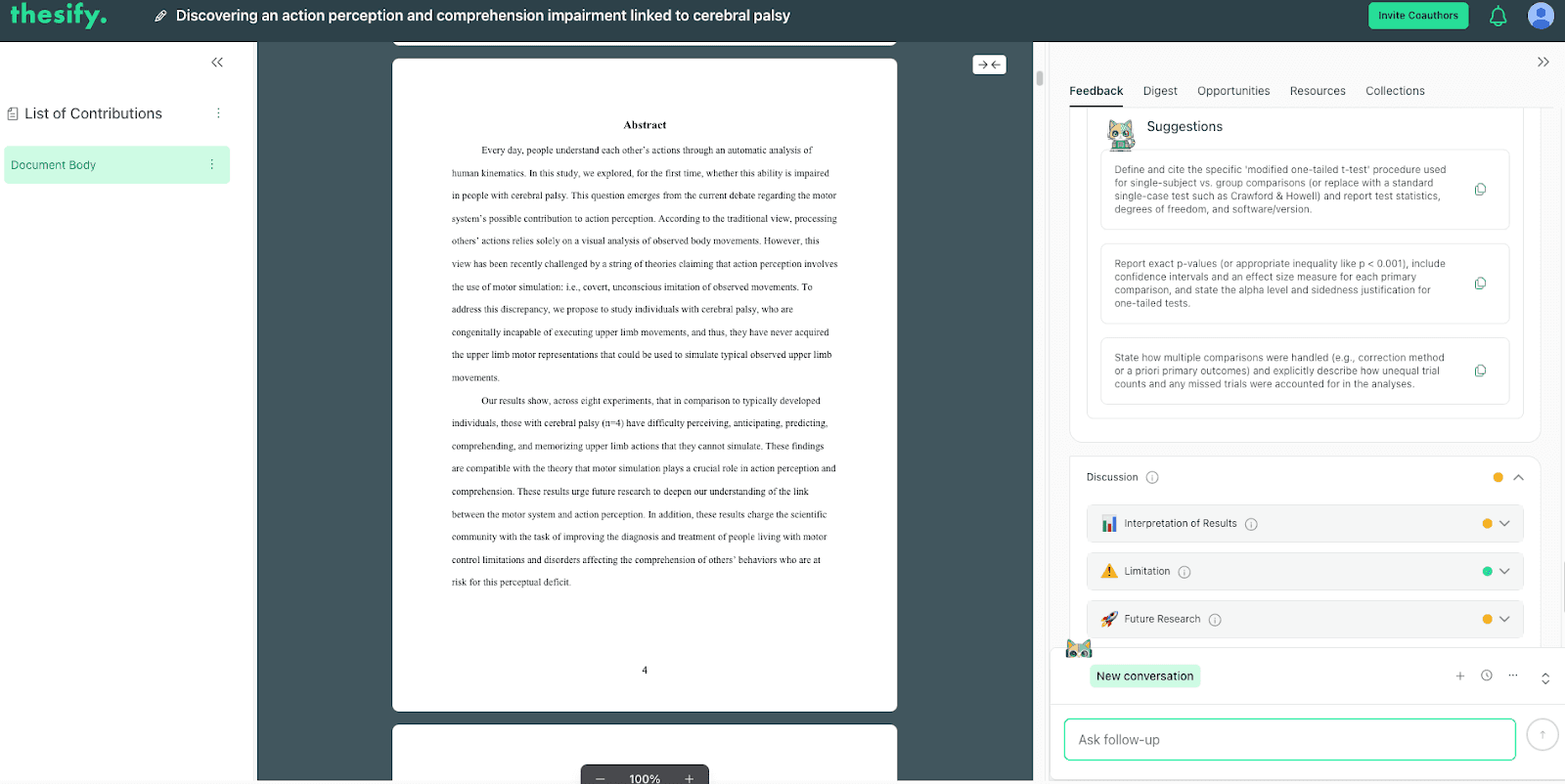
Example of actionable suggestions and how thesify breaks Discussion feedback into interpretation, limitations, and future research.
Step 3: Apply Revisions Using a Two-Pass Edit
To move quickly without creating new inconsistencies, separate your edit into two passes:
Pass A, reporting completeness: add the missing details the feedback flags (for example, n, denominators, degrees of freedom, effect sizes, confidence intervals, software versions, or figure-level takeaways).
If you are working heavily with visuals, you can also use thesify to strengthen your tables and figures before submission.
Pass B, reader-facing clarity: tighten topic sentences, standardise how you present statistics, and relocate interpretation into the Discussion where needed.
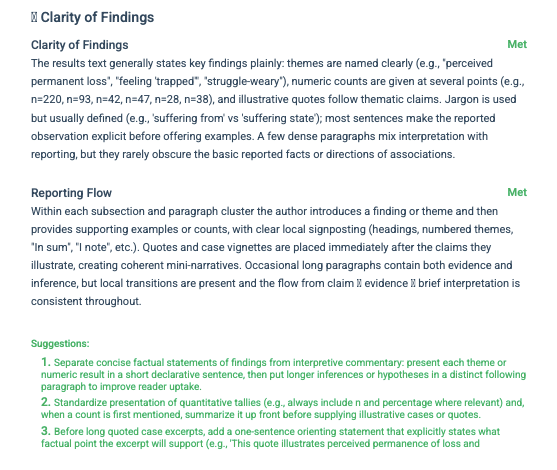
Actionable guidance is grouped by Results-specific criteria, so you can revise structure and reporting without guessing what a reviewer will flag.
Step 4: Re-Run the Report to Confirm the Issues Are Resolved
After you revise, run the report again and confirm that:
the same issues do not reappear in a different form (common with Results wording and Discussion claims),
your updates did not introduce new inconsistencies (for example, mismatched n across text, tables, and figure captions),
each section reads cleanly as its own unit (Methods replicable, Results descriptive, Discussion interpretive).
Step 5: Use Chat with Theo to Interpret Suggestions and Align with Journal Requirements
If you are unsure how to implement a suggestion, open Chat with Theo and ask for:
a ranked list of changes by likely reviewer impact
rewrite options for a specific paragraph (especially Results topic sentences and Discussion claim calibration)
a quick cross-check against your target journal’s author guidelines (reporting, structure, word limits, figure requirements)
Used this way, section-level feedback helps you submit a Methods section that is replicable, a Results section that is transparent, and a Discussion section that is proportionate to the evidence.
FAQ About thesify’s New Methods, Results, and Discussion Feedback
What Is thesify’s Section-Level Feedback for Methods, Results, and Discussion?
thesify’s section-level feedback is a pre-submission tool that evaluates the Methods, Results, and Discussion independently. Instead of broad, generic commentary, you get section-specific checks and actionable edits that align with what peer reviewers typically scrutinize first.
How Does Section-Level Feedback Improve Methods Section Quality and Replicability?
For Methods section reporting, the tool flags gaps that commonly trigger reviewer pushback, including:
unclear sampling and inclusion criteria
missing procedural detail needed for replication
incomplete or inconsistent description of measures and endpoints
analysis plans that are not explicit enough to evaluate validity
What Statistics Should You Report for Results Section Statistics Reporting?
For results section statistics reporting, thesify pushes you toward transparent, complete reporting. Depending on your design, that typically includes:
sample sizes (n) for each analysis and subgroup
test names and what comparison each test addresses
test statistics (where applicable) and degrees of freedom
exact p-values (or appropriate thresholds such as p < 0.001)
effect sizes and confidence intervals (when relevant)
software and key parameters where they affect interpretation or reproducibility
Quick Results Self-Check:
Each results block starts with a one-sentence finding statement (direction + outcome).
Every key claim is paired with the minimum stats needed to evaluate it.
Figures and tables are referenced with one clear takeaway, not repeated number-dumps.
Interpretive or causal language is reserved for the Discussion.
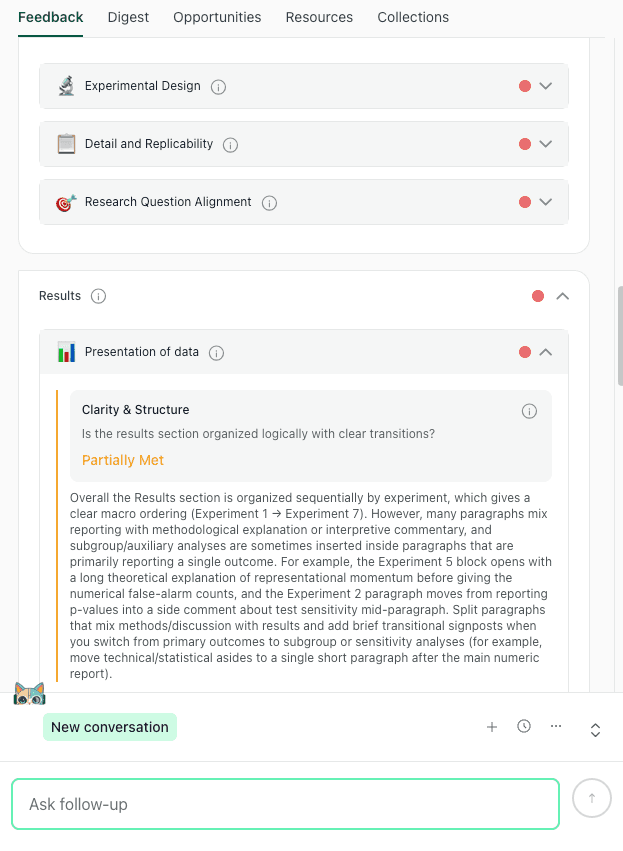
The Results tab highlights presentation, clarity, and statistical analysis checks so you can tighten reporting before submission.
How Does Discussion Feedback Reduce Discussion Section Overclaiming?
Discussion feedback focuses on whether your interpretation stays proportionate to what you actually reported. It helps you:
recalibrate claims that drift beyond the data
link each interpretive statement back to specific results
tighten causal language and scope, especially when the design cannot support causal inference
state limitations in a way that explains how they affect validity and generalisability
turn broad “future work” paragraphs into concrete, feasible research directions
Will AI Feedback Replace Journal Peer Review?
No. thesify is a pre-submission support tool. It helps you improve reporting quality and reduce avoidable reviewer objections, but it does not replace editorial assessment or external peer review.
Is This Only for Quantitative Papers?
No. Section-level feedback is useful for quantitative, qualitative, and mixed-methods scientific papers across disciplines. In qualitative work, the Results feedback often focuses on structure, clarity, separation of description from interpretation, and transparent reporting of analytic procedures.
What If thesify’s Suggestions Conflict with My Field Norms or Journal Style?
Treat the feedback as a decision-support layer. Use it to identify risk areas, then adapt revisions to match your field’s conventions and the journal’s author guidelines.
Try thesify’s Section-Level Feedback Before Your Next Journal Submission
Catch missing Methods details, Results reporting gaps, and Discussion overclaims before peer review. Sign up for thesify for free, upload your manuscript to thesify to get section-level feedback for Methods, Results, and Discussion, with clear, actionable revisions you can apply immediately.
Related Posts
How to Get Table and Figure Feedback in thesify: Peer review feedback on visuals is often accurate but underspecified. When someone writes “unclear figure” or “table is not well integrated,” you still have to diagnose the cause, decide what to change, and translate that into a revision plan your co-authors can execute. Get table and figure feedback in thesify using a rubric for integration, captions, labeling, readability, and data checks, with PDF export and co-author access.
How to Submit a Paper to a Journal: Step-by-Step: Submitting to an academic journal is not a single click. It is a workflow that combines journal selection, compliance with author guidelines, a clean submission package, and a clear editorial narrative. Learn how to submit a paper to an academic journal, from choosing a target journal to preparing files, cover letters, and what happens after submission. Plus, get advice on how to build a shortlist that is realistic for your topic and article type, which reduces the chance of immediate rejection for scope mismatch.
How to Respond to Reviewers’ Comments on Your Journal Manuscript: Receiving a decision letter after peer review can be both exciting and daunting. It’s rare for a manuscript to be accepted without revisions; most papers require changes before publication. A thoughtful response to reviewers’ comments is thus not optional. Editors expect a document that summarises the changes and answers every point raised. This guide will help you prepare a clear, respectful, and persuasive response to reviewers' letters, improving your chances of acceptance and making the revision process smoother for everyone involved.