How to Get Grant Proposal Feedback With thesify


Securing timely and constructive feedback on a grant proposal before submission is a common challenge for researchers. The difficulty stems from the fact that expert reviewers are often overcommitted, submission deadlines are stringent, and consequently, feedback frequently arrives too late for effective incorporation.
As researchers, a structured grant proposal feedback workflow becomes invaluable to expedite the identification of deficiencies, streamline the revision process, and subsequently communicate a clear summary of changes to collaborators or supervisors.
This guide shows you how to get grant proposal feedback through thesify, what a typical grant proposal review looks like inside the platform, and how to use Theo’s feedback to run a repeatable grant proposal revision loop.
If you want a broader overview of how early review fits into academic workflows, see What Authors Need to Know About Pre-Submission Review vs Peer Review.
Why Getting Grant Proposal Feedback Before Submission Is So Difficult
Early feedback is routinely recommended, yet it is difficult to execute well. Three structural constraints tend to intervene, even in strong research groups:
Reviewer availability is mismatched to funding timelines. Colleagues often review when they can, not when you need it.
Feedback quality varies with familiarity. A close methodological reader may miss fit-to-call issues, while a generalist reader may focus on clarity but overlook feasibility.
Comments arrive as observations rather than a revision plan. You may receive perceptive notes, but not a clear order of operations.
A useful way to think about grant feedback is to separate two different failure modes:
Completeness gaps, where expected components are missing or hard to locate (impact, partners, work plan, budget logic, timeline, risks).
Clarity gaps, where the components exist but are difficult to evaluate (aims are diffuse, outcomes are not measurable, methods are underspecified).
This distinction aligns closely with how reviewers score, and it maps directly onto what a structured grant proposal review tool can do well: flag missing components, then diagnose section-level weaknesses.
How To Get Feedback on a Grant Proposal Before Submission
Grant proposal feedback is a structured review of your draft against funder expectations, clarity, and feasibility, focusing on aims, methods, impact, budget logic, and timelines. Effective feedback identifies missing components and section-level weaknesses, then translates them into a revision plan you can execute before submission, alongside scheme-specific human peer review.
However, a proposal that “sounds good” can still be hard to score. Reviewers assess whether you have made a coherent, evaluable case under time pressure. Pre-submission feedback is most useful when it targets the same problem reviewers face: locating and evaluating key claims quickly.
A workable approach is to use two complementary review modes:
Structured review (fast, repeatable): identify missing components, weak sections, and feasibility signals that need strengthening.
Human peer review (scheme-aware): stress-test fit to the call, implicit assumptions, and disciplinary expectations.
Before you revise, it helps to confirm the requirements of the call you are targeting. In thesify’s feedback panel, you can use Resources and select Grants to browse opportunities, search by title or keywords, review opening dates and deadlines, then click Go to Call to read the funder’s requirements.
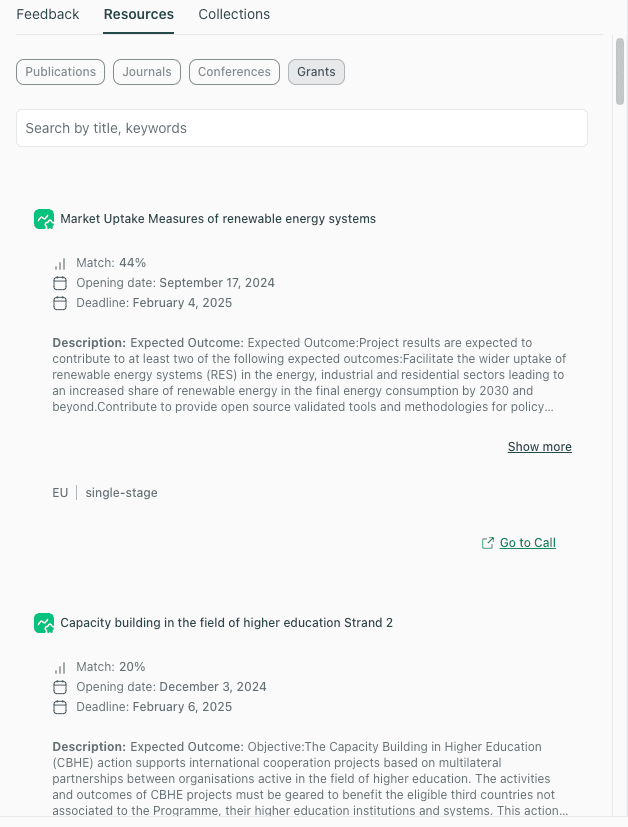
Grant Finder in thesify Resources, browse grant opportunities and open the call details to confirm requirements before revising your proposal.
Once you have the call requirements in view, Theo’s grant proposal feedback is easier to apply because you can revise toward the components and level of detail the funder expects.
thesify’s Grant Assistant
If you are still deciding where to apply, thesify’s Grant Assistant can help you identify grant opportunities that match your research area and preferences. You provide brief background information (and, if useful, upload supporting documents), then review a list of relevant grants to decide which calls to pursue.
Once you have selected a call and drafted your proposal, Theo’s grant proposal feedback helps you run a repeatable revision process, from missing components through section-by-section recommendations, before you circulate the draft for scheme-specific human review.
Preparing For Grant Proposal Revision
The quickest way to improve feedback quality is to make your draft scannable and auditable. That is true for a senior colleague, a research development officer, and for a structured grant proposal review tool.
Make Section Boundaries Explicit
Use headings that match the units reviewers look for. Even when a funder template differs, the logic is recognisable:
Title
Summary or Abstract (if used)
Background / Rationale
Goals / Objectives
Methods / Approach
Work Plan (work packages, milestones)
Impact
Team / Partners
Risks and Mitigation
Budget and Budget Rationale
Timeline
This is not cosmetic. It reduces the risk that strong content is missed because it is difficult to locate.
Reduce “Interpretive Load”
Academic reviewers do not primarily reject for style. They reject for unclear evaluability: they cannot tell what will be done, when, by whom, and how success will be assessed.
Before you upload, do a short audit:
Can you state the aim in one sentence without qualifiers?
Can you list deliverables in bullets?
Are methods staged (not a single block of prose)?
Are outcomes measurable (even if approximate)?
Is feasibility legible (timeline and staffing logic are coherent)?
If you want a practical model for documenting AI-assisted revision workflows, AI Tools for Academic Research frames the “save an artifact” approach that many academics use for transparency.
How to Use thesify’s Grant Proposal Feedback Feature
In this section, you will learn the exact steps to upload your grant proposal to thesify and receive Theo’s feedback.
To get grant proposal feedback in thesify, the key is to upload your draft and correctly label it as a Grant proposal during the document details step. That selection helps Theo interpret your draft using grant-writing conventions (rather than manuscript or thesis conventions).
Step 1: Upload Your Document
In the left sidebar, upload your file using the upload option in the workspace.
Wait until the upload completes and the document opens in the main viewer.
Step 2: Confirm Authorship and Select “Grant Proposal”
After upload, thesify prompts you to provide a small amount of information about the file you uploaded:
Are you the author? Select Yes or No based on your situation.
Under Select type of document, click Grant proposal.
Click Next.
This step matters because it frames Theo’s evaluation as a grant proposal review rather than general academic writing feedback.
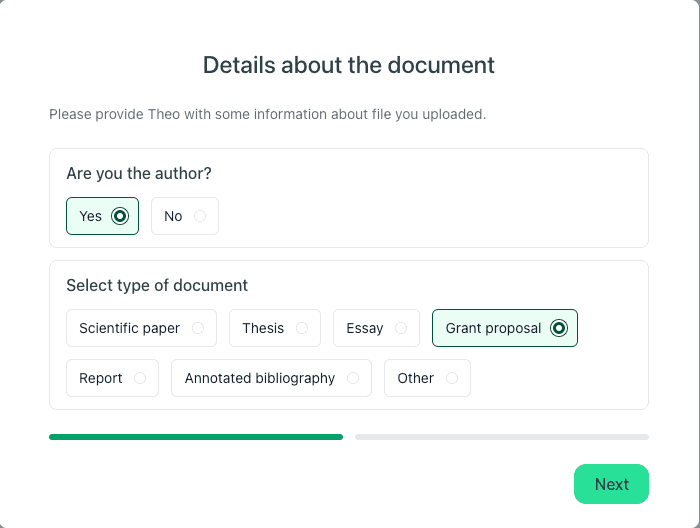
Select ‘Grant proposal’ so the feedback matches grant-writing expectations
Step 3: Open the Feedback Panel
Once your proposal is open, look to the right-hand side panel and select the Feedback tab. In the interface shown, you will see:
Refresh (to re-run feedback after you revise your draft)
Export (to download a shareable feedback report)
Expandable feedback sections:
Feedback summary
Title
Background
Goals
Methods
Impact
Partners
Work Packages
Deliverables
Budget
Timelines
Click each section to expand it and read Theo’s comments on that part of your proposal. This is the fastest way to locate section-level issues that affect clarity and reviewer confidence, which supports grant proposal editing without forcing you to hunt through a long report.
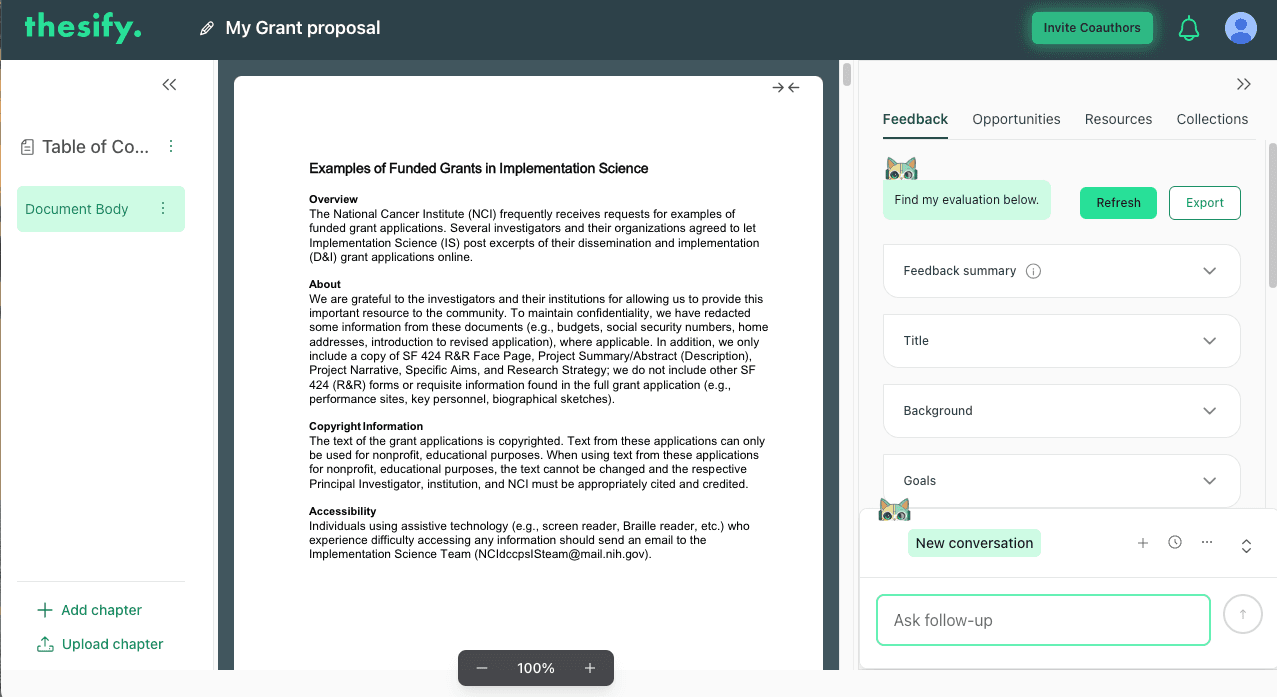
Theo’s feedback is organized by summary and sections, and can be refreshed after edits.
Step 4: Use Chat With Theo for Follow-Up Questions
At the bottom of the Feedback panel, use Chat with Theo (the box labeled Ask follow-up) to ask questions about the feedback.
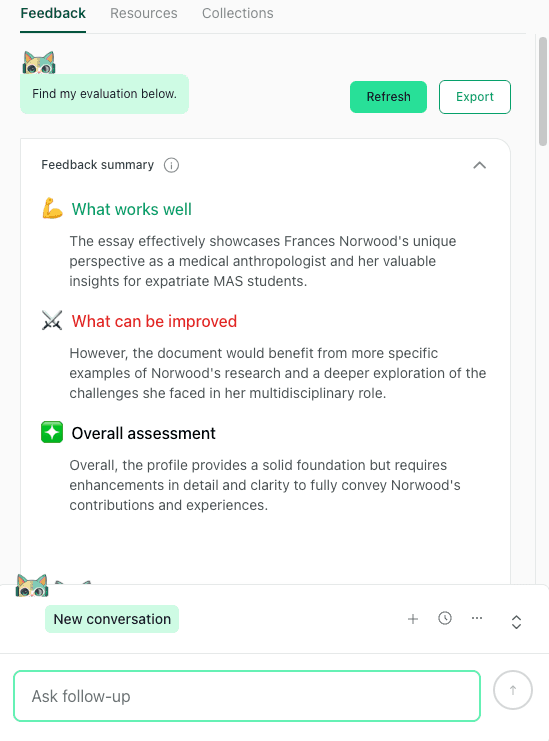
Chat with Theo lets you ask follow-up questions about your grant proposal feedback, directly from the Feedback panel.
Use this to ask targeted questions that translate feedback into concrete revision moves, for example:
“List the missing components you flagged, in priority order.”
“Rewrite my goals as one aim, 3 objectives, and measurable outcomes.”
“What feasibility signals are missing from my methods section?”
If you want a detailed example of how to use Chat with Theo to turn feedback into specific revisions, you can reference our Chat with Theo Guide.
Step 5: Refresh Feedback After Revisions, Then Export
After you edit your draft:
Click Refresh to regenerate Theo’s feedback on the updated version.
Click Export to download the feedback report and share it with co-authors, mentors, or research support staff.
For a walk-through of how the exported report is structured and how teams typically use it in revision workflows, see How to Use thesify’s Downloadable Feedback Report for Pre‑Submission Success.
Grant Proposal Feedback Software for Academics: Understanding Theo’s Feedback
When you generate grant proposal feedback in thesify, Theo returns a structured report designed for grant proposal review and grant proposal revision. The format is consistent and revision-oriented: a top-level assessment to prioritise work, a completeness check you can treat as a grant proposal checklist, and section-by-section feedback that breaks edits into concrete actions (Feedback, Recommendations, Missing Elements).
What Theo’s Grant Proposal Feedback Report Includes
Theo’s grant proposal feedback report is organized to help you do two things quickly
Identify what is missing or underdeveloped
Turn feedback into a concrete revision plan before submission
Overall Assessment
The report begins with an Overall Assessment, a high-level read on how submission-ready your draft is as written. It typically includes:
What is working well, so you do not remove strengths during revision
What needs improvement, focusing on issues that reduce evaluability (for example, unclear aims or feasibility signals)
A short overall judgement of readiness that helps you decide what to revise first
If you are asking “how do I get feedback on a grant proposal before submission,” this is the fastest place to start because it provides immediate prioritisation.
Components Assessment
Next, Theo provides a Components Assessment, which functions as a completeness check. It is designed to surface whether core proposal elements are present and sufficiently developed for review.
This is where the report often saves time, because many proposals underperform due to omissions or sections that exist but are too thin to evaluate.
Missing Components
The report lists Missing Components as a clear revision checklist. Depending on what you uploaded, Theo may flag items such as:
Goal of the proposal (a clear, unambiguous goal statement)
Final deliverables (what you will produce, in concrete terms)
Impact (who benefits, what changes, how impact is evidenced)
Risks and mitigation strategy (what could go wrong, how you will respond)
Partners (who is involved and what each party contributes)
Work package breakdown (work packages with aims, milestones, and deliverables)
Budget (budget logic and level of detail appropriate to the call)
Timeline (phases, milestones, and elapsed time from start to finish)
If you uploaded a partial draft or an early excerpt, Missing Components reflect what is not currently present in the document. In that case, treat the list as a plan for what to add next.
Superfluous Components
The Components Assessment may also flag Superfluous Components. This refers to material that is unlikely to help reviewers score the proposal, or content that could be consolidated to reduce repetition and improve readability.
Typical outcomes of this part of the report include:
Identifying sections that repeat the same framing and could be merged
Noting content that is not required for the proposal format and may distract from evaluation
Suggesting where tighter structure would make the proposal easier to navigate
Theo’s report starts with a high-level assessment and a completeness check, as shown below.
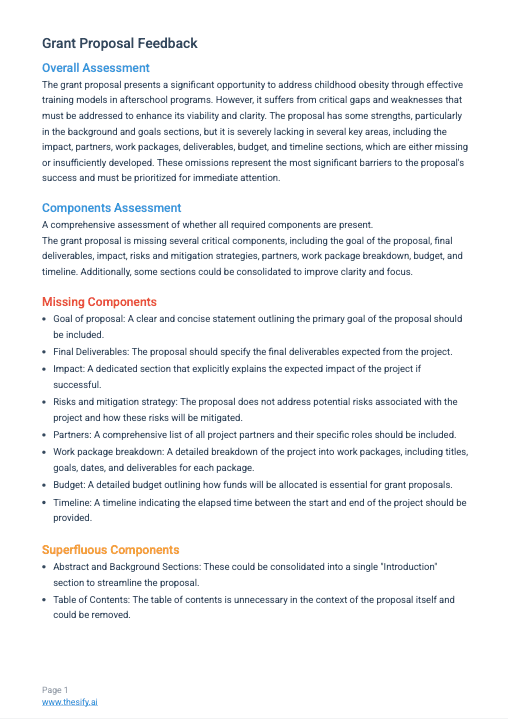
Theo’s report starts with an overall assessment, then a components assessment that flags missing components and superfluous components you can turn into a revision checklist.
Section-By-Section Feedback (With Recommendations and Missing Elements)
After the high-level and completeness layers, Theo moves through your proposal section by section (for example, Title, Background, Goals, Methods). This is the part of the report that supports hands-on grant proposal editing.
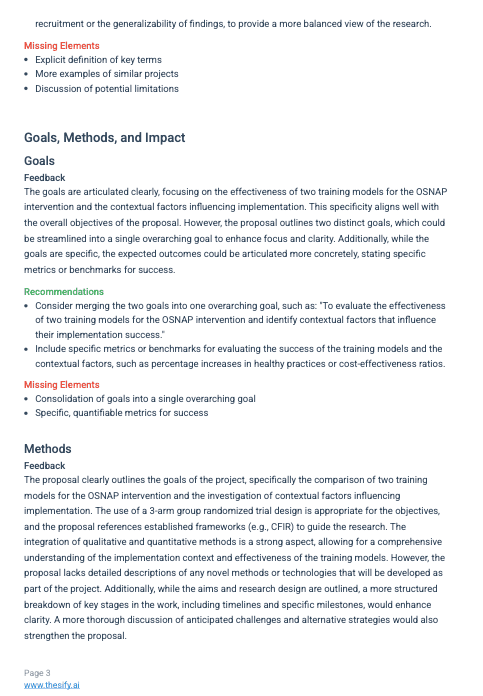
Theo’s report starts with an overall assessment, then a components assessment that flags missing components and superfluous components you can turn into a revision checklist.
For each section, Theo provides three components:
Feedback: what is clear, what is unclear, and what limits evaluation
Missing Elements: concrete items you should add so the section is complete and reviewable
Recommendations: specific revision actions to address the issues raised
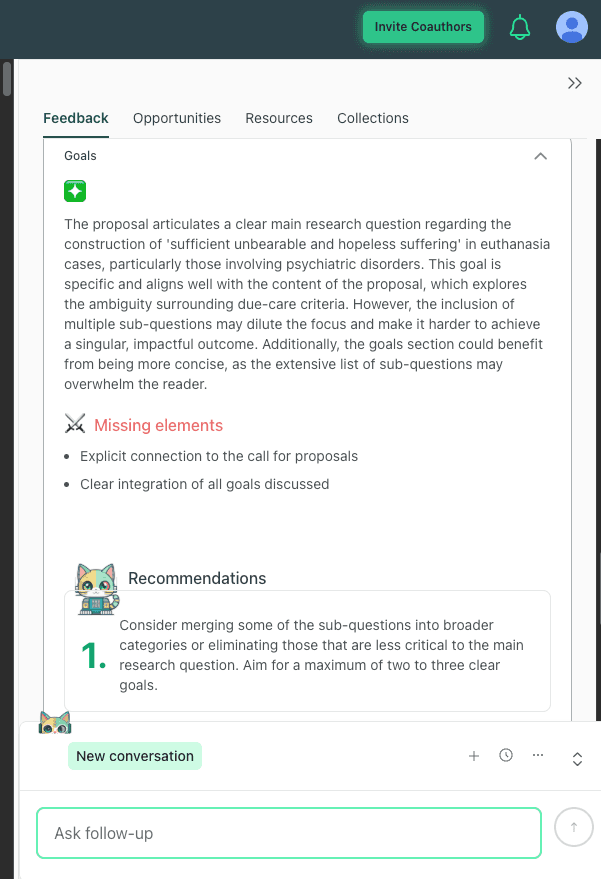
Example of section-level grant proposal feedback in thesify, with missing elements and recommendations for revising the goals section, plus Chat with Theo for follow-up questions.
This structure is particularly useful when you are working on questions like:
“How to improve a grant proposal goals section”
“Grant proposal background section tips”
“Grant proposal title feedback examples”
“How to respond to grant proposal feedback”
Across sections, the report commonly focuses on reviewer-facing signals such as clarity, scope control, measurable outcomes, feasibility, and whether claims are supported by enough detail to be evaluated quickly.
Using Grant Proposal Feedback to Revise Your Proposal
Use Theo’s grant proposal feedback to fix missing components first, then tighten section-level clarity, then iterate with Refresh and Export.
Grant Proposal Checklist: Fix Missing Components First
Start with the Components Assessment and copy the Missing components list into a working document. Treat each missing item as a writing task with a clear heading in your proposal. This is your grant proposal checklist, and it is the fastest way to address preventable omissions that often drive weak reviews.
Use the checklist below as a template for what to add or strengthen:
Goal Of The Proposal: Write a 1–2 sentence goal statement that defines the primary aim in plain, evaluable terms (what you will test, build, implement, or demonstrate).
Final Deliverables: List tangible outputs, for example datasets, protocols, tools, reports, training materials, or interventions. Where possible, tie each deliverable to a milestone.
Impact: State who benefits, what changes, and how impact will be evidenced. Keep this concrete, avoid aspirational phrasing without a mechanism.
Risks And Mitigation Strategy: Identify the main risks (technical, recruitment, regulatory, implementation, data access) and specify mitigation actions, including fallback options where appropriate.
Partners: List collaborators and define roles and responsibilities clearly (what each partner contributes, what they lead, and what they support).
Work Package Breakdown: Break the project into phases (work packages) with titles, objectives, milestones, and deliverables. Include approximate sequencing so feasibility is visible.
Budget: Provide the allocation logic (major cost categories and why they are needed). This addresses “what to include in a grant proposal budget” concerns without requiring full financial detail in the narrative.
Timeline: Present a timeline that shows elapsed time from start to finish, with milestones aligned to work packages and deliverables.
Once these headings exist and contain substantive content, the remaining work becomes higher value grant proposal editing rather than emergency patching.
Grant Proposal Revision Priorities: What Reviewers Need First
Not all edits are equal. Prioritise revisions in the order reviewers typically need information to assess a proposal quickly:
Goal and Outcomes: If the goals are diffuse, consolidate them into one overarching aim plus a short list of objectives. Add measurable outcomes wherever possible (benchmarks, thresholds, or clear audit points).
Impact and Partners: Strengthen impact and partner roles early because these sections often determine whether the project looks feasible and funder-aligned.
Work Packages, Timeline, Budget Logic: Reviewers often reject on feasibility grounds when these elements are missing or not aligned. Make sure your work packages, timeline, and budget narrative tell the same story.
Section-Level Clarity: Use Theo’s section feedback to tighten the title, restructure the background with subheadings, and reduce ambiguity in methods.
When you revise methods, focus on evaluability signals: staged approach, milestones, dependencies, anticipated challenges, and what you will do if assumptions do not hold.
Refreshing Feedback and Exporting a Report (Revision Loop and Collaboration)
After you revise, return to thesify and regenerate feedback so you can confirm that your edits solved the right problems.
Update your document: Upload a revised version (or update the existing document, depending on how you are managing drafts).
Click Refresh: This regenerates Theo’s AI grant feedback on the updated text.
Compare changes intentionally:
The Components Assessment should show fewer missing components, ideally none.
Section-level feedback should shift from “missing elements” and structural gaps toward precision edits and clarity improvements.
Click Export: Download the feedback report so you can share it with co-authors, mentors, or research development colleagues as part of your grant proposal review process.
Revision Loop: From Draft to Submission
A practical way to use thesify’s feedback as a grant proposal revision loop is to export after each major revision pass (structure pass, feasibility pass, final clarity pass). That gives collaborators a stable artifact to comment on and reduces back-and-forth misunderstandings about what changed and why.
Iterate and Improve
Grant writing is inherently iterative. Expect multiple rounds of revision and feedback. Use thesify’s feedback cycle—upload, read, revise, refresh—to progressively refine your proposal. Each iteration should reduce the number of missing components and improve the clarity of your narrative.
If you have specific questions about the feedback, use Chat with Theo and type them into the Ask follow‑up field in the Feedback tab. Theo can clarify why a particular section was flagged or suggest examples of strong impact statements.
Invite Collaborators
Most grants improve substantially when you combine structured feedback with scheme-aware human review. In thesify, click Invite Coauthors (upper right) to share the project workspace with collaborators. For a clean review workflow:
Export the feedback report and send it to co-authors, mentors, or research support staff so everyone is looking at the same diagnostic summary.
Assign revision ownership by section (for example, one person revises impact and partners, another revises methods and timeline).
Reconcile human comments with the structured report. If a colleague flags fit-to-call issues or disciplinary expectations, integrate those changes, then Refresh feedback to confirm that the revised draft remains complete and coherent.
Used this way, Theo’s grant proposal feedback supports a disciplined grant proposal review process, while human reviewers contribute scheme knowledge, disciplinary judgement, and strategic framing.
Grant Proposal Feedback FAQ
How Do I Get Feedback on a Grant Proposal Before Submission?
To get grant proposal feedback in thesify, upload your draft, select Grant proposal as the document type, then open the Feedback panel. Start with the Overall Assessment, then use the Components Assessment as your grant proposal checklist of missing sections. Revise, click Refresh for updated AI grant feedback, then Export the report if you need to share it with collaborators.
Who Can Review My Grant Proposal Before Submission?
A strong grant proposal review usually combines structured tool-based feedback with scheme-aware human feedback. Ask colleagues who have submitted to the same funding programme, research support staff (if available), and one or two generalist readers to test clarity. This mix helps you catch feasibility gaps, weak framing, and sections that are hard to evaluate quickly.
What Are Common Reasons Grant Proposals Are Rejected?
Common reasons include weak fit to the call, goals that are not clearly stated or measurable, a methods section that lacks feasibility signals, and missing or underdeveloped components such as impact, partners, work packages, budget rationale, and timeline. Reviewers also frequently flag internal inconsistencies, for example, a work plan that does not match the budget or timeline.
What Components Should Every Grant Proposal Include?
Most calls expect, at minimum:
A clear goal of the proposal (aim plus specific objectives)
Final deliverables (what you will produce)
Impact (who benefits, what changes, how it will be evidenced)
Risks and mitigation strategy
Partners and defined roles (if applicable)
A work package breakdown with milestones and deliverables
A budget with allocation logic
A timeline that shows phases and key milestones
Use this as a baseline grant proposal checklist, then adjust for the funder’s format and scoring criteria.
How Do You Respond to Grant Proposal Criticism?
Treat feedback as a set of revision tasks rather than a general verdict. Identify whether the critique is about (1) missing information, (2) unclear logic, or (3) feasibility. Respond by making the smallest change that solves the reviewer’s uncertainty, then re-check that your goals, methods, timeline, and budget still align.
Are AI Tools Useful for Grant Proposal Feedback?
AI tools can be useful for grant proposal feedback when they provide structured outputs you can revise against, especially missing-component flags and section-by-section recommendations. In thesify, Theo’s feedback report supports grant proposal editing by separating high-level assessment from section-level issues. Treat AI feedback as one input, then incorporate human review for scheme fit and disciplinary judgement.
How Much Detail Should I Include in a Grant Proposal Budget and Timeline?
Include enough detail to demonstrate feasibility and coherence. A good rule is that a reviewer should be able to trace each major budget category back to a work package, and each work package to milestones on a timeline. If you are unsure what level of detail is expected, follow the call guidance first, then use feedback to tighten alignment across goals, methods, budget, and timeline.
Get Grant Proposal Feedback in thesify for Free
Sign up for thesify for free, upload your draft as a Grant proposal, review Theo’s structured grant proposal feedback, click Refresh after revisions, and Export a report to share with your co-authors before submission.
Related Posts
AI Proofreading Tools vs Built‑In Checkers: Do You Really Need Both?: In research writing, a single typo can undermine the credibility of your argument. Built‑in proofing tools in Word and Google Docs catch basic errors—but are they enough when you’re drafting a thesis or journal article? Or do you need a dedicated AI grammar tool to produce polished prose? This article examines the strengths and weaknesses of built‑in checkers and third‑party AI tools, drawing on empirical studies and surveys to help you decide if external tools are necessary for your academic writing workflow.
Chat with Theo: A New Way to Turn Feedback into Revision: Learn what Chat With Theo brings to your feedback workflow. Theo, thesify’s writing coach AI, can now answer any follow-up questions on the feedback thesify provides. For example, you can ask Theo, your AI writing tutor, “what does weak analysis mean here?” and get immediate guidance. Check out how Chat with Theo fits into the existing thesify workflow and feedback-first process. thesify’s essay feedback AI gives you direction, and Chat with Theo now helps you act on it. Unlike some AI tools that just generate text for you, Theo engages you in improving your draft.
How to Use thesify’s Downloadable Feedback Report: With more universities encouraging the use of AI writing tools, a new challenge emerges: how to document machine‑generated feedback in a way that is transparent and easy to share. This is where AI feedback report PDFs come in. thesify, an AI‑supported tool for researchers and students, doesn’t just highlight typos or suggest synonyms. It produces a structured report you can download as a PDF and keep beside your draft while revising. Having a portable, timestamped document of your draft’s strengths, weaknesses and next steps solves the persistent problems of version control and scattered feedback. In this article you’ll learn what a pre‑submission assessment report looks like, how thesify’s report stands out, and how you can generate and use your own downloadable report.