Best AI Tools to Improve Academic Writing 2026

Writing at doctoral level is rarely a problem of ideas alone. Most researchers can explain their projects clearly in conversation. Difficulty arises when those ideas must become a 70-page dissertation chapter, a tightly argued article, or a grant proposal with strict page limits. The work of academic writing lies in giving structure to complex material, making claims traceable to evidence, and maintaining a precise, discipline-appropriate style from first paragraph to last.
AI tools in 2026 will sit inside that process rather than outside it. Used carefully, they help you improve academic writing by making weaknesses more visible: gaps in reasoning, unclear topic sentences, inconsistent terminology, missed references, or formatting issues that invite desk rejection.
The tools reviewed here thesify, Writefull, Paperpal, Elicit, and Connected Papers, are selected not because they can write for you, but because they are well suited to helping you write and revise more effectively yourself.
Who This Guide on AI Writing Tools Is For
This guide is written for:
PhD students drafting or revising dissertations, articles, and conference papers
Advanced master’s students working on substantial theses
Postdoctoral researchers and early career academics managing multiple manuscripts at once
Examples focus on research intensive writing: thesis chapters, empirical articles, book chapters, and grant proposals. Shorter coursework assignments are not the main target, although many of the same principles apply.
When using this guide, you can:
Skim the overview table to see which AI tools best match your current task (for example, language editing versus literature discovery).
Read the tool specific sections for detailed use cases, limitations, and integrity considerations.
Use the workflow section to map these tools onto your own process, from literature review to final submission.

Overview of the Best AI Tools To Improve Academic Writing in 2026
This guide focuses on five academic AI tools that address different aspects of academic writing:
thesify for feedback on structure, argumentation, and use of evidence; pre-submission checks
Writefull for sentence-level academic English and style
Paperpal for language support integrated with citation checks
Elicit for literature discovery, evidence mapping, and comparative summaries
Connected Papers for visualizing networks of related research
You do not need all five tools at once. The benefit comes from matching each tool to a specific writing task and using it in a controlled way.
Table Summary: Top AI Tools To Improve Your Academic Writing In 2026
The table below summarizes how each tool can support your academic writing in 2026.
Tool | Main role in academic writing | Best fit for | Key strengths | Points to watch |
Structured feedback on clarity, logic, and evidence use; pre-submission checks | Revising thesis chapters, articles, and grant sections | Reviewer style comments that target structure and argument quality (thesis statement) | Does not correct grammar or formatting | |
Sentence level language edits and academic phrasing | Polishing drafts, especially for non-native English writers | Models trained on journal articles; widgets for paraphrasing, abstracts, and titles; secure handling of text | Focuses on wording, not argument; subscription needed for full features | |
Integrated drafting, editing, citation support, and pre-submission checks | Collaborative projects and submissions to selective journals | Context aware language suggestions, AI assisted citations, plagiarism and pre-submission checks | Full workflows may encourage over reliance; uploading full drafts raises privacy questions | |
Literature search, evidence tables, and research planning | Systematic and narrative literature reviews, background sections | Semantic searches over large paper corpora, tables with sentence level citations | Does not edit your text; summaries must be checked against originals | |
Visual maps of related work and citation networks | Scoping new topics and checking bibliographies | Graphs of prior and derivative works; overviews of research clusters | No editing or feedback; graphs can give a partial view of a field |
This overview is deliberately limited to five tools. Many lists try to cover dozens of applications, but for most PhD workflows, a compact set of well understood tools is easier to integrate and explain to supervisors or committees.
Using AI To Improve Structure and Argument
For many doctoral writers, the largest gains come from improving the structure of dissertation chapters and articles. That work is difficult to do alone, because it means reading your own draft like a critical reviewer. This is where thesify is most useful.
thesify: Feedback, Structure, and Pre-Submission Assessment
As a diagnostic feedback tool, thesify helps academic writers transform early drafts into publishable manuscripts by clarifying structure and argument flow.
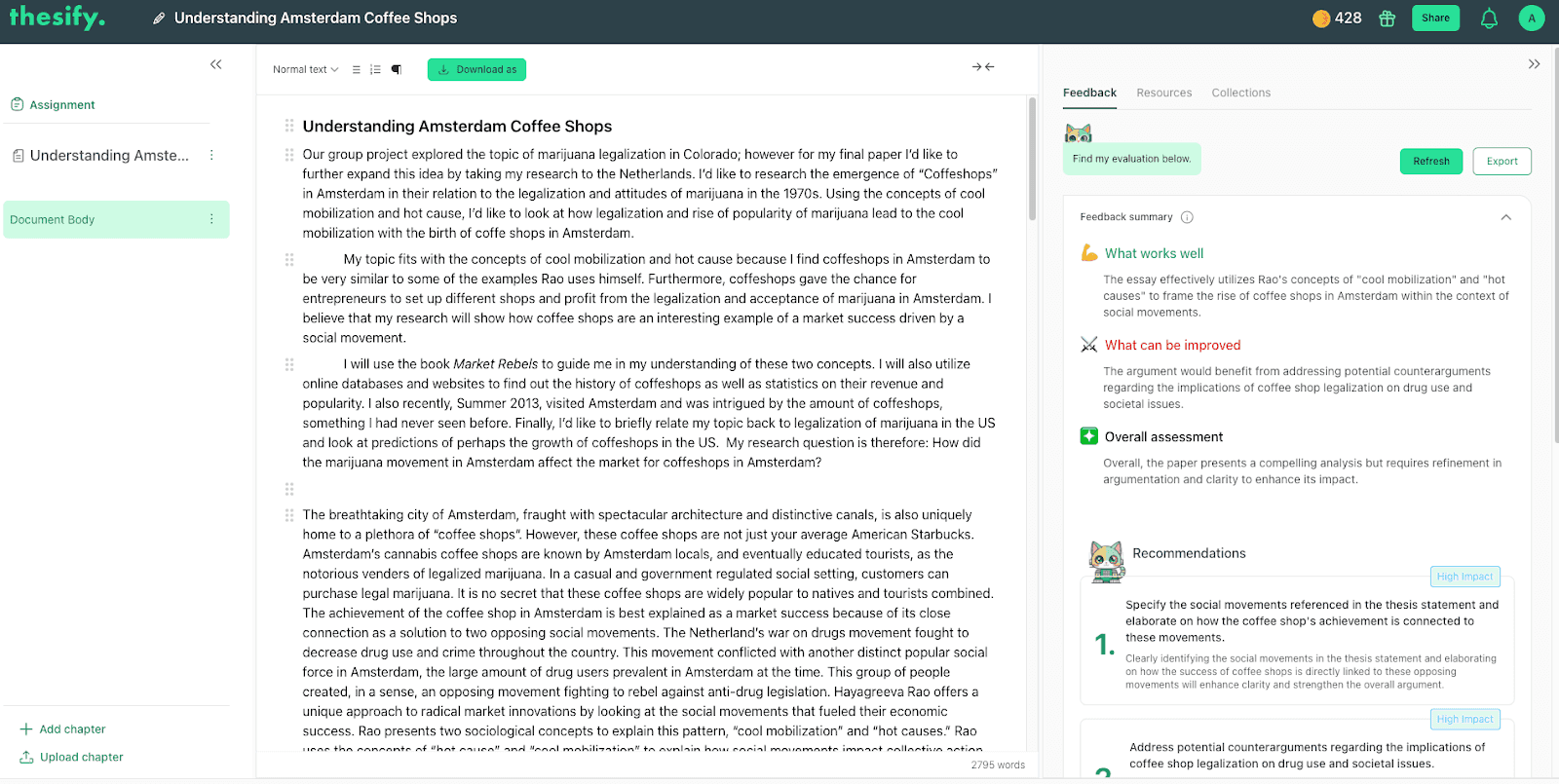
In thesify, the draft on Amsterdam coffee shops appears alongside a feedback summary and numbered recommendations that help the writer refine clarity, argumentation, and use of evidence.
What thesify does for your writing
thesify reads your draft and returns structured feedback on clarity and logic. Instead of rewriting sentences, it comments on questions such as:
Is the main claim or research aim clearly stated and easy to locate?
Do sections build toward that claim in a coherent way?
Where does the text assume background knowledge that is not explained?
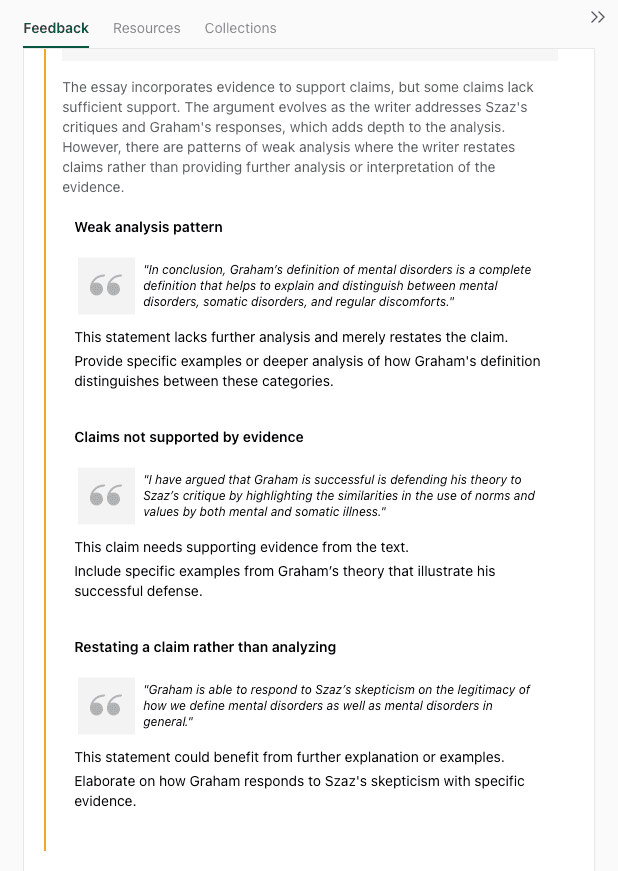
A thesify feedback report shows examples of weak analysis and unsupported claims, with concrete suggestions on how to develop the argument and use evidence more effectively.
Do introductions and conclusions of sections match what is actually argued inside them?
In other words, thesify helps you see the architecture of the text and where that architecture is not yet doing its job.
How to use thesify to improve a chapter or article
Choose a complete unit of writing.
Upload a full chapter, article draft, or substantial section. Fragmented paragraphs provide less useful feedback.
Read the feedback as if it were a reviewer report.
Note recurring concerns: unclear aims, jumps in reasoning, weak transitions, or poorly supported claims.
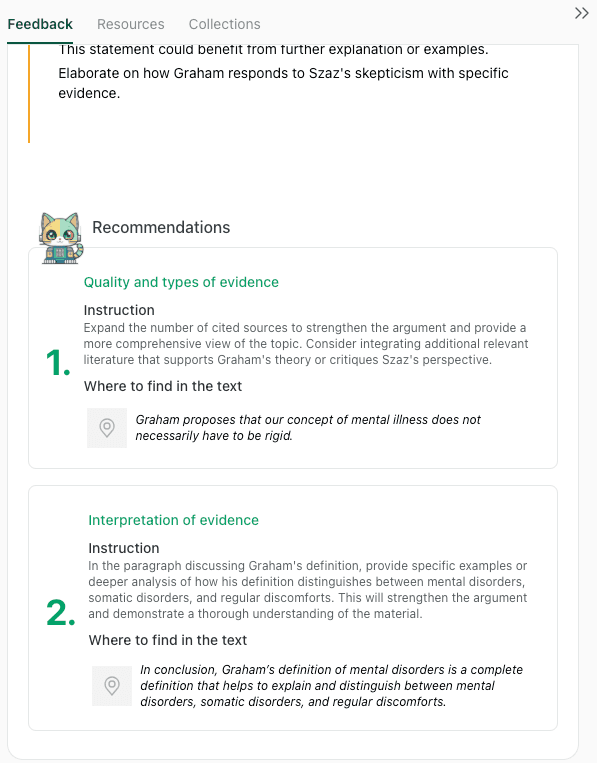
High impact recommendations in thesify point writers to exact sentences where evidence can be expanded or interpreted in more depth, turning general feedback into concrete revision tasks.
Map comments back to your text.
For each issue, mark the relevant sentences. This converts general “clarity” remarks into concrete revision tasks.
Revise in focused passes.
First pass: adjust section ordering and headings.
Second pass: refine topic sentences and transitions.
Third pass: reinforce explanations and add missing evidence.
Re-run only when major changes are complete.
Treat thesify as a periodic diagnostic, not as a perpetual spell checker.
Using thesify’s Suggested Topics To Improve Academic Writing
Beyond structural feedback, thesify’s Suggested topics feature helps you check whether a draft actually answers the question that you set. This is a recurring problem in academic writing: arguments are often thoughtful, but they drift away from the main topic, reviewer question, or research aim.
In the Suggested topics panel, thesify surfaces key questions implied by your manuscript type and shows how well your current draft answers each one.
For example, in a manuscript on illness narratives, thesify asks questions such as,
“How do illness narratives help to convey the personal experiences of suffering?” and “How do personal experiences of suffering differ from the way suffering is represented or coded in narratives?”
Under each question, thesify summarizes how the manuscript responds and notes where comparison, depth, or specific examples could be strengthened.
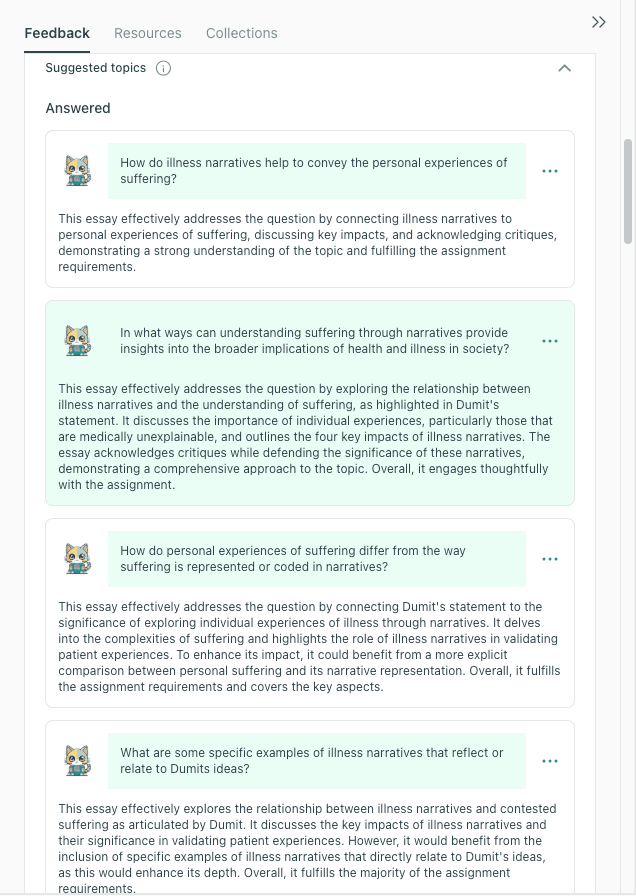
In the suggested topics view, thesify evaluates how an illness narratives manuscripts responds to key questions in the field and provides paragraph-level comments on coverage, depth, and overall fit.
These structured prompts make thesify one of the most effective AI tools for PhD writing in 2026, helping researchers maintain clarity and focus across long projects.
You can use this feature to improve academic writing in several ways:
Check alignment with your main research question.
If the Suggested topics panel repeatedly highlights questions that are only partially answered, your draft may need clearer focus or additional sections.
Identify missing links between theory and data.
When comments point out that concepts are explained but not connected to empirical material, this flags places where analysis needs to be deepened.
Plan targeted revisions.
Because each topic-level comment is tied to a specific question, you can turn it directly into a revision task in your to-do list.
This is particularly helpful for PhD writers working on long projects. Over months of drafting, it is easy for a chapter to drift. Running the Suggested topics view before sharing a draft with supervisors can help ensure that the text stays anchored to the project’s central questions.
thesify’s pre-submission assessment
After revising, you can export a thesify downloadable feedback report and use it as a checklist while you plan your next round of revisions or discuss changes with a supervisor.
A sample thesify report, titled Theo’s Review, presents a clean cover page for feedback on a manuscript about CPS referral bias in unintentional ingestion cases.
thesify’s downloadable feedback report:
Summarizes strengths and weaknesses in clarity, structure, and use of evidence
Groups comments into categories that mirror common reviewer concerns
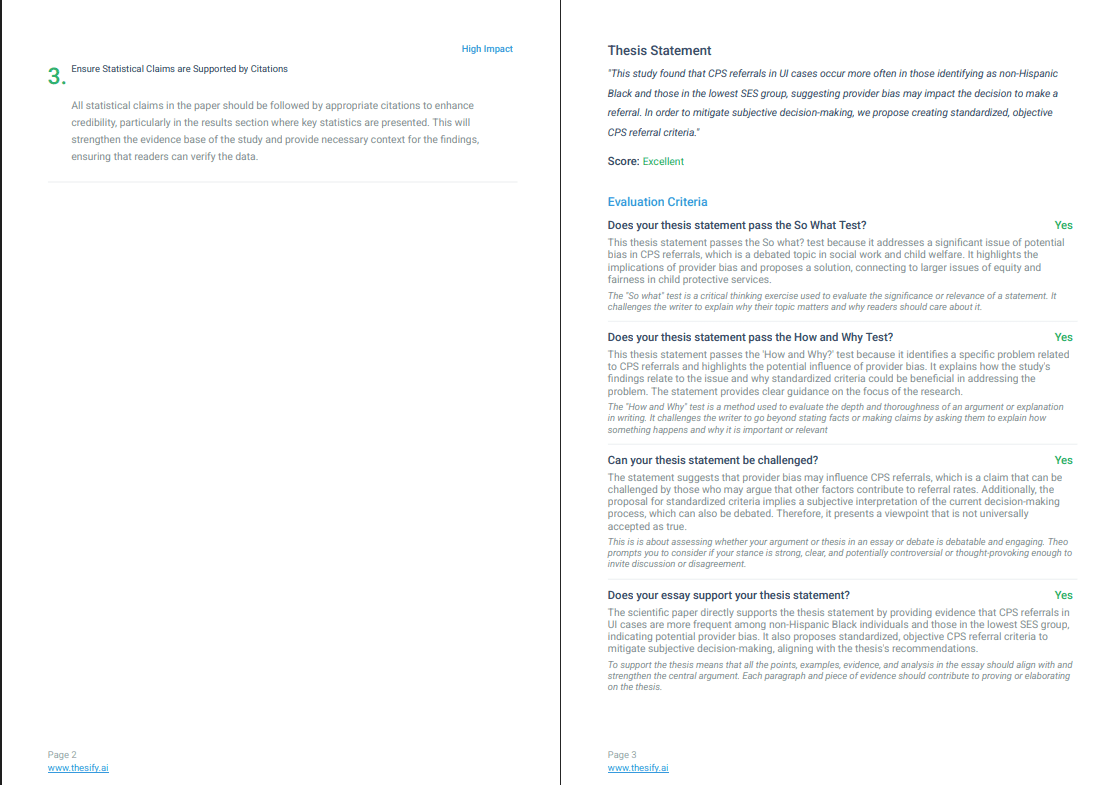
Inside Theo’s Review, the thesify report combines numbered recommendations with a rubric style evaluation of the thesis statement, helping writers align evidence, claims, and research questions before submission.
Gives you a checklist of issues to address before you send the draft to a supervisor, committee, or journal
In practice, this pre-submission assessment works like a rehearsal peer-review: it tells you how a critical reader is likely to experience the text, while you still have time to adjust.
thesify’s Readability Scores for Tracking Progress
thesify also offers a readability score that can be useful for tracking your own progress as you revise. The Flesch–Kincaid Grade Level report, for example, gives a rough sense of how complex your sentences and vocabulary are.
For most PhD-level work, a higher grade level is expected, but extremely high values may signal very dense writing that supervisors or examiners find tiring to read.
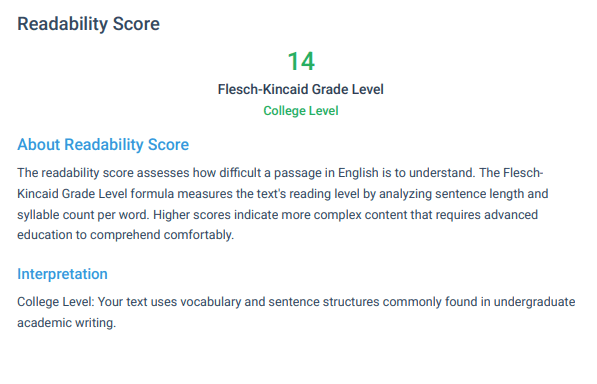
thesify’s readability report estimates the passage at Flesch Kincaid Grade Level 14, indicating college level vocabulary and sentence structure.
A readability score does not replace judgement about style. Instead, treat it as a prompt to revisit passages where long sentences pile up, or where several subordinate clauses are doing too much work. Shortening or restructuring those sentences often improves clarity without reducing sophistication.
thesify: Limitations and Risks
thesify does not correct spelling or grammar. It works best alongside an editor such as Paperpal for language issues. Because it evaluates structure, its feedback can be demanding; you must be prepared to revise deeply rather than make superficial tweaks. As with any AI tool, you should avoid uploading confidential data or unpublished research without confirming your university’s AI use policies.
thesify: Ethical use
Use thesify as a second reader rather than a ghostwriter. Incorporate its suggestions into your own revisions and maintain your academic voice. Do not copy feedback verbatim into your thesis without reflection; instead, treat it as guidance. Always acknowledge in your thesis that you used AI‑based feedback if your institution requires disclosure, and keep chat logs to document the tool’s role.
Using AI To Improve Sentences, Style, and Readability
Once the structure of a chapter or article is sound, attention moves to sentence-level writing: grammar, word choice, and tone. This is where Writefull and the language-editing components of Paperpal are most helpful.
Writefull: Academic English for Research Writing
What Writefull does for your writing
Writefull is built for academic text. When you submit paragraphs or sections, it suggests edits to:
Grammar and syntax
Word choice and collocations typical of research writing
Punctuation and minor consistency issues
It also offers widgets that help with:
Drafting and refining titles
Rephrasing sentences while preserving meaning
Checking whether a phrase is common in academic corpora
How to use Writefull to improve your drafts
Use Writefull after structural revisions, not before. Otherwise you spend time polishing text that may be cut.
Work in short segments (for example, one section or page) so that you can review suggestions carefully.
Treat suggestions as prompts. When Writefull offers a change, decide whether it fits your field and your meaning instead of accepting everything automatically.
Writefull is particularly useful for writers working in English as an additional language, but even native speakers often discover that certain habits (for example very long sentences or vague verbs) become more visible.
Writefull works best when you have some sense of how expectations differ by field. It can help to pair its suggestions with a basic understanding of differences in academic writing across disciplines, so you can decide when to accept changes and when to keep a disciplinary nuance.
Writefull: Limitations and Risks
Writefull focuses on language rather than argumentation, so you need to handle structure yourself or use a tool like thesify. Some advanced features require a subscription. As with any editing tool, there is a risk of over‑reliance; ensure your academic voice remains intact.
Writefull: Ethical Use
Use Writefull to improve clarity and academic tone, but avoid letting it rewrite your arguments. Document its use in your thesis if required and verify its suggestions. Do not upload sensitive or unpublished data to any AI service without checking your institution’s privacy policies.
Are uncertain about your institution’s AI policies? Check out Navigating AI Policies for PhD Students in 2025: A Doctoral Researcher’s Guide.
Paperpal: Language and Submission Checks for Research Papers
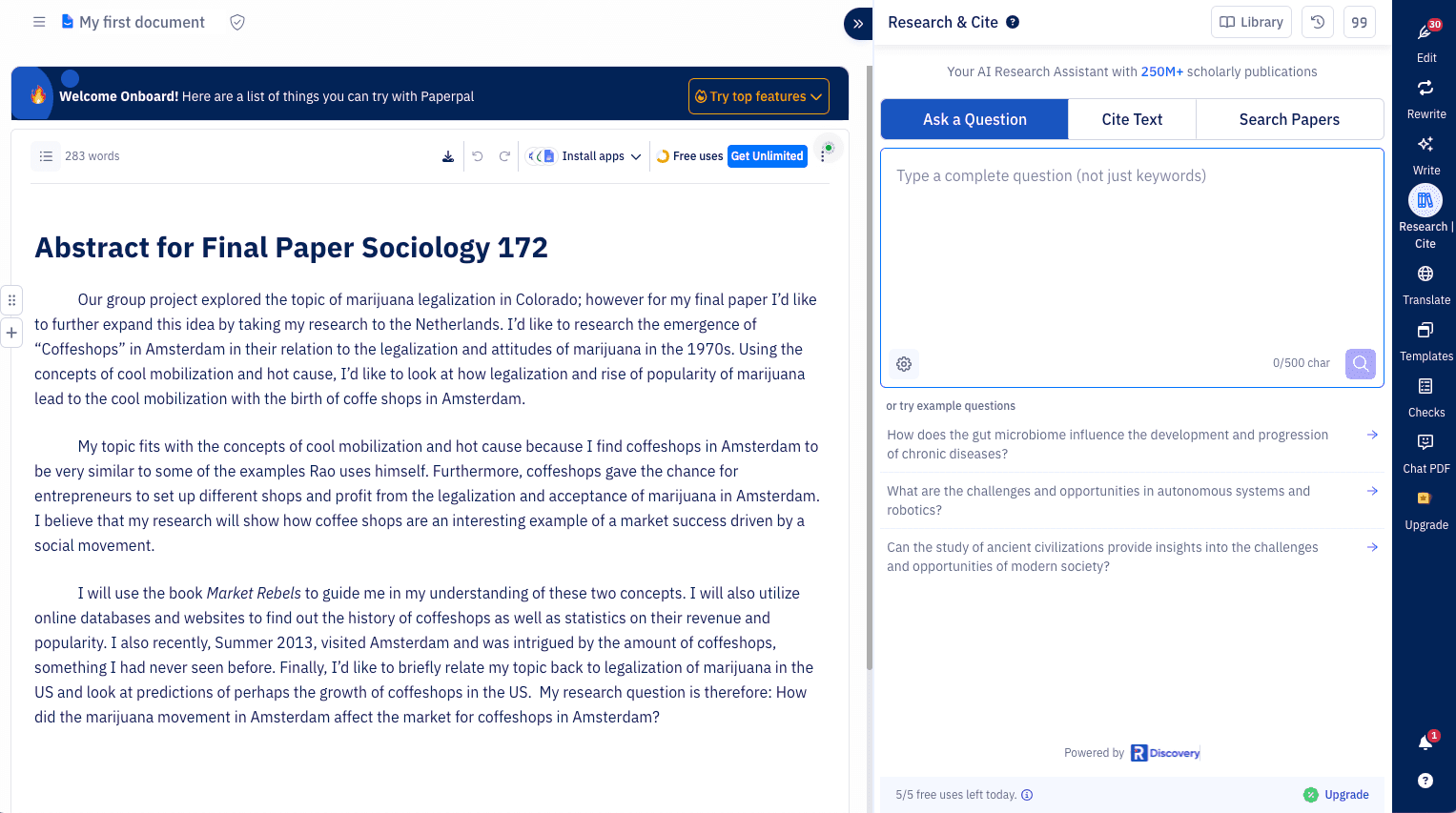
Paperpal displays a sociology abstract on Amsterdam coffee shops while the Research and Cite panel offers question prompts and links to scholarly sources.
What Paperpal does for your writing
Paperpal provides a broader environment for academic writing and revision. Its language features include:
Context-aware grammar and clarity suggestions
Recommendations for shortening long, complex sentences
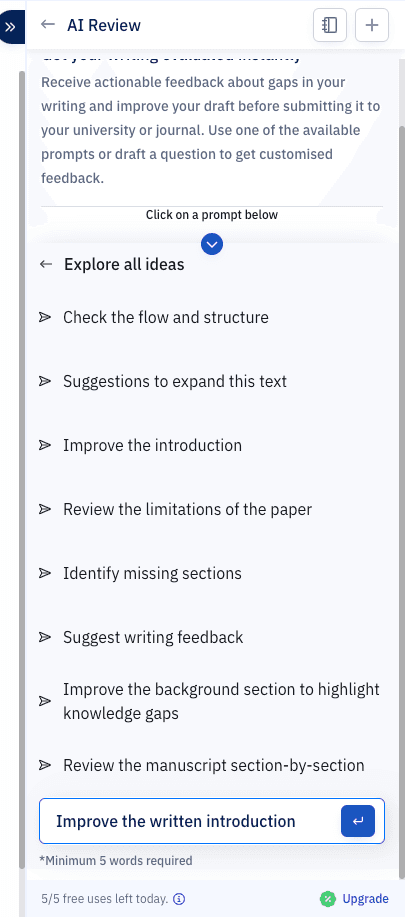
The AI Review sidebar in Paperpal provides targeted prompts that help writers check flow, expand sections, and refine introductions before submission.
Help with repetition and term consistency
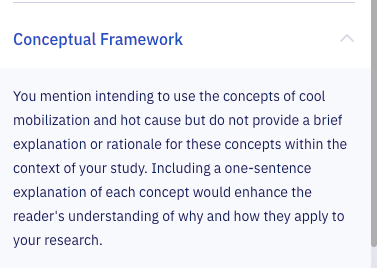
A feedback card in Paperpal points out that concepts like cool mobilization and hot cause need a short explanation so readers understand how they apply to the research question.
Beyond language, Paperpal also supports:
Reference and citation checks
Journal-specific technical checks
Similarity and overlap checks that help you notice potential concerns before submission
How to use Paperpal to improve clarity and consistency
Use Paperpal when you work with multiple co-authors who write in different styles. Its language and consistency checks can help harmonize the final manuscript.
Run Paperpal’s checks near the end of the writing process, once main content decisions have been made.
Combine its suggestions with your own style sheet (a simple document where you record preferred spellings, abbreviations, and key terms).
Paperpal: Limitations and Risks
As an all‑in‑one tool, Paperpal may not match the depth of specialised services such as Writefull’s language feedback or Elicit’s systematic review. Some features are only available in paid plans. You should still conduct your own literature evaluation rather than relying solely on AI‑generated search results.
For more advice on evaluating academic literature, read How to Evaluate Academic Papers: Decide What to Read, Cite, or Publish.
Paperpal: Ethical Use
Use Paperpal to streamline your workflow while maintaining control over content. When using translation or paraphrasing features, double‑check that the meaning remains accurate. Keep citation management transparent and verify that references are correctly formatted. Always disclose the tool’s role if your institution requires it.
Expert Tip: Always consult official citation and reference style guides. To locate these guides all in one place, refer to The Ultimate Collection of Free Citation Guides for Students and Researchers.
Using AI To Improve Literature Reviews and Framing
Strong academic writing depends on strong framing. A chapter can be well structured and polished at the sentence level, yet still feel thin if the literature review is incomplete, descriptive, or unclear about where your study fits.
Elicit and Connected Papers are most useful precisely at this point. They do not replace reading. Instead, they help you see patterns and connections that you can turn into sharper paragraphs, clearer topic sentences, and better justified research gaps.
Elicit: Turning Evidence Tables Into Stronger Paragraphs
Elicit is a research assistant centered on literature. It searches across large corpora of papers using semantic similarity, then organizes key information in tables. For each study, you can often see methods, samples, outcomes, and other details side by side.
Used carefully, Elicit’s structure helps you improve academic writing by revealing analytical patterns that you can translate into comparative sentences and coherent paragraphs.
From list to synthesis.
Instead of summarizing one article per paragraph, you can use the table to group studies and write comparative claims such as “Most longitudinal studies report X, whereas cross-sectional work points to Y.”
More precise topic sentences.
Patterns in the table make it easier to write topic sentences that say something meaningful about a body of work, not just “Many scholars have studied this topic.”
Clearer justification of gaps.
When you see that certain populations, methods, or contexts are missing from the table, you can explain that gap explicitly in your literature review and connect it to your own research question.
A practical way to use Elicit for writing, not just searching, is:
Start from a focused question. Enter your research question or narrow keywords so that the table reflects the part of the field you actually need to write about.
Choose columns that matter for your argument. For example, methods, sample, outcome, and year can often drive the structure of a review chapter.
Read across rows to spot patterns. Note where studies agree, where they conflict, and which approaches are rare.
Draft claims directly from the table. Translate patterns into sentences and subsection headings, then check each against the original papers before finalizing your text.
Use the table when revising. If supervisors ask for “more analysis” in the review, return to the table and see whether you can refine your groupings or strengthen your comparative claims.
When you treat Elicit as a tool for building comparative sentences and well-structured paragraphs, it becomes one of several AI tools for literature reviews that support better academic writing rather than replacing your own synthesis.
Elicit: Limitations and Risks
Elicit’s focus is on literature rather than writing; it does not edit your manuscripts. It works best for empirical research but may not cover all qualitative or theoretical sources. As with any AI search tool, verify that its results align with your field’s databases and cross‑check key papers manually.
Elicit: Ethical Use
Use Elicit to complement, not replace, your literature search. Validate AI‑generated summaries by reading the original papers. When citing, ensure that you have read and understood the sources. Observe data‑handling policies: Elicit’s features may require uploading screening criteria or search results; avoid sharing any non‑public data.
Need more guidance on university’s data-handling policies and AI? Read Generative AI Policies at the World’s Top Universities: October 2025 Update for clear examples from the world’s top universities.
Connected Papers: Designing Coherent Literature Review Structure
Connected Papers generates a visual graph of articles related to a chosen “seed” paper. Nodes represent papers and clusters show groups of related work. This visual map is particularly helpful for planning and revising the structure of a literature review.
When you use these visual connections to plan subsections and flow, you produce literature reviews that are logically structured, concise, and easier for reviewers to follow — a direct improvement in academic writing quality.
For academic writing, Connected Papers supports three concrete tasks:
Planning subsections.
Clusters in the graph often correspond to schools of thought, methodological traditions, or subtopics. Each cluster can become a subsection in your review, with a heading that reflects its distinct contribution.
Ordering the narrative.
Edges and citation directions suggest how ideas develop over time. You can use this to decide whether your review should move chronologically, thematically, or from foundational to recent work.
Explaining scope.
The graph makes it easier to describe what you are including and excluding. You can say, for example, that your review focuses on two central clusters and only briefly notes peripheral strands.
A practical way to use Connected Papers to improve writing is:
Generate a graph from one or two pivotal papers. Choose work that sits at the center of your project, not general overviews.
Identify three to five meaningful clusters. Give each cluster a working label that could become a subsection heading, such as “qualitative studies of X” or “policy-focused analyses of Y.”
Assign key papers to each subsection. Within a cluster, select representative articles and note how they differ from or respond to each other.
Draft subsection introductions from the graph. Use the structure of the cluster to write topic sentences that position your own work: what this strand has established, where the debates lie, and what remains unresolved.
Use the graph during revision. If reviewers or supervisors say the review feels scattered, return to the graph and check whether your headings and paragraph order still match the conceptual structure it suggests.
Connected Papers: Limitations and Risks
Connected Papers does not offer writing or editing features. Its graphs may oversimplify complex intellectual debates and rely on citation data that may lag behind the very latest publications. Always verify important connections manually.
Connected Papers: Ethical Use
Use Connected Papers to complement formal literature searches rather than as a sole source of references. When building your bibliography, double‑check that the papers it suggests are peer‑reviewed and relevant. Avoid uploading proprietary or embargoed references.
By using Elicit and Connected Papers in this way, you are not only finding more articles. You are giving yourself better raw material for strong literature-review paragraphs, clearer framing of your research gap, and a more coherent structure for your thesis or article.
Building an AI-Supported Academic Writing Workflow
Improving academic writing involves repeated practice. AI tools help most when they are placed in specific roles within a single, coherent workflow rather than used at random. One possible PhD writing workflow in 2026 might look like this:
Scoping and planning
Use Connected Papers to generate graphs around key papers and assemble an initial reading list.
Use Elicit to expand that list and to map methods, samples, and findings into an evidence table.
Draft a provisional outline for the literature review based on clusters and gaps.
Drafting sections and chapters
Improving structure and argument
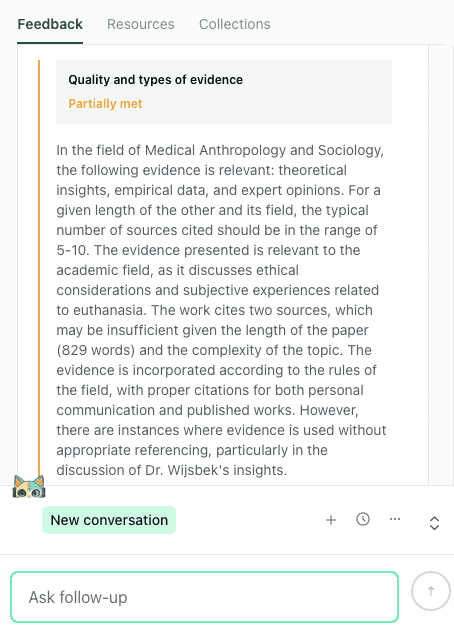
A feedback card in thesify explains expectations for evidence in medical sociology, comments on the number of sources, and flags places where claims about euthanasia need clearer citations.
Improving language and readability
Use Writefull for sentence-level editing once structure is settled.
For collaborative work, use Paperpal to harmonize style, tidy up language, and check references.
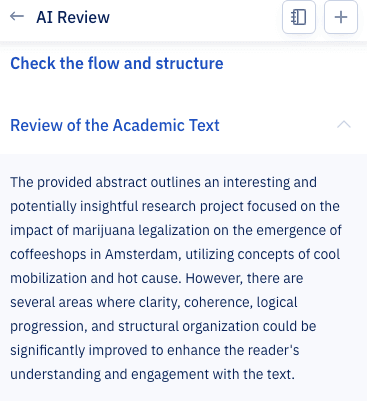
The AI Review panel in Paperpal gives a narrative summary of how well an abstract on marijuana legalization and coffee shops handles clarity, coherence, and structural flow, guiding the next round of revisions.
Final checks and documentation
Combine automated checks from thesify with human proofreading from supervisors or peers.
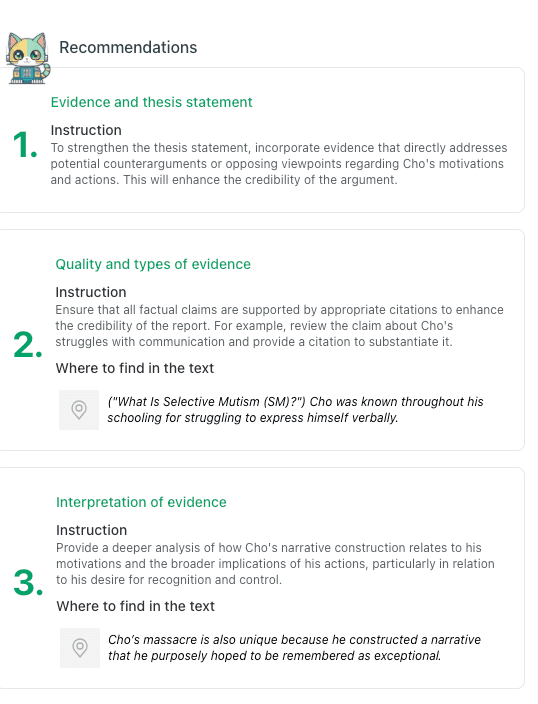
Numbered recommendation cards in thesify highlight where to strengthen the thesis statement, add citations, and deepen interpretation of evidence, each linked to specific sentences in the draft.
Record which tools were used at each stage, so any required disclosures are straightforward.
Using AI Tools Responsibly in Academic Writing
Improving writing quality should never come at the expense of academic integrity. Most universities and journals now operate with three basic expectations pertaining to AI use for academic writing:
Authorship remains with you. Tools can propose wording, reorganize sections, or suggest references, but you are responsible for the reasoning, the accuracy of claims, and the originality of the contribution.
Data protection is non-negotiable. Do not upload confidential data, sensitive interview material, or embargoed results into third-party systems without explicit permission.
Transparency is expected. When AI tools have materially shaped the wording or structure of a submission, you should be ready to describe that use if supervisors, examiners, or editors ask. Check out our tips on how to maintain a clear AI audit trail while you write
Many departments now provide written examples of ethical use cases of AI in academic writing rather than treating AI as a topic that can be ignored. These documents often distinguish between acceptable AI tool support (for example language editing or structural feedback) and unacceptable practices (for example generating entire drafts or fabricating references).
These expectations are consistent with how professors detect AI in academic writing. Supervisors tend to notice sudden shifts in style, inconsistencies between coursework and thesis chapters, or technical language that does not match the writer’s demonstrated level of understanding. Transparent use of tools reduces suspicion and focuses attention on the quality of the work itself.
Are you planning on publishing your academic writing? Make sure to review the AI Policies in Academic Publishing 2025: Guide & Checklist.
Be Cautious With Full Rewrites and “Make Academic” Menus
A growing number of tools offer one-click “rewrite,” “make academic,” or “improve fluency” options for entire paragraphs. These menus can be helpful for small, local edits, but they also carry specific risks for academic integrity:
A full rewrite can subtly change the meaning of your argument, introduce claims you have not checked, or create links between ideas that the data do not support.
Paragraph-level rewrites make it harder for supervisors and examiners to see your own voice and reasoning, since the resulting text may resemble generic prose from many other users.
If you accept large blocks of rewritten text without careful review, it becomes difficult to give an honest account of which sentences you actually wrote.
The Paperpal interface below, for example, includes a rewrite menu that offers actions such as paraphrase, make academic, improve fluency, simplify, trim, and change tone. Used cautiously on short segments, such options can help clean up phrasing. Used to regenerate whole sections, they shift the balance from assistance to ghostwriting.
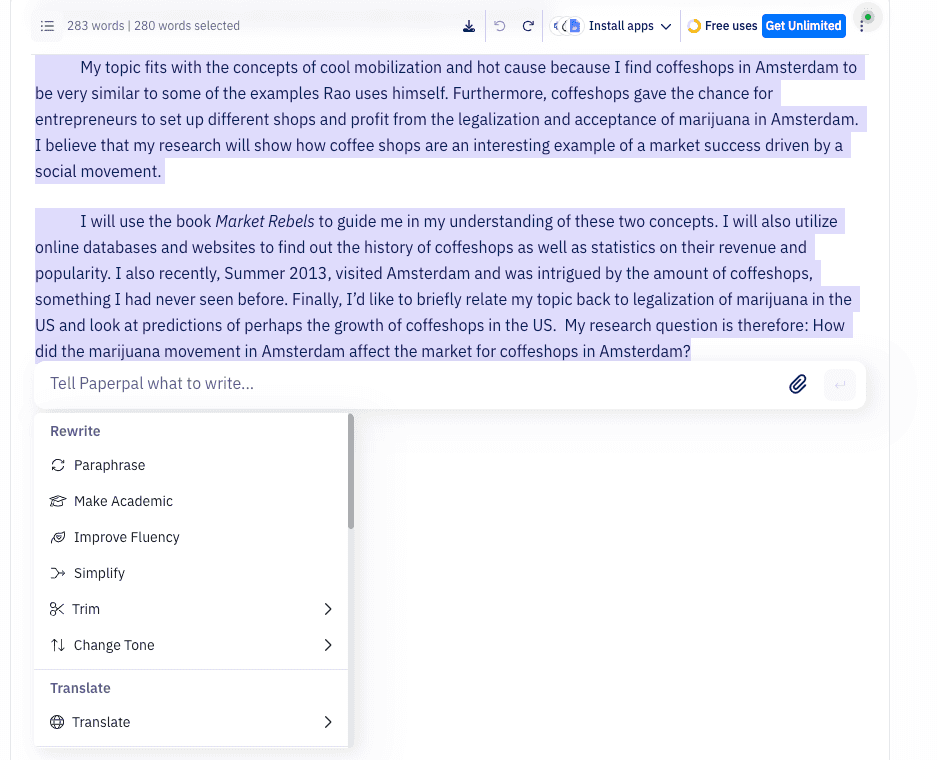
In Paperpal, writers can highlight part of an abstract and open the rewrite menu to paraphrase, adjust tone to academic, improve fluency, or shorten the passage while keeping the core meaning. In research contexts, these options should be applied to small units of text and followed by careful review.
A practical approach is to limit these features to:
Short phrases or individual sentences that you already understand and can explain in your own words
Cases where the meaning is preserved and you can verify every reference and claim afterward
Drafting support for ideas that you immediately rework, rather than text you paste into a final version without revision
In other words, treat rewrite menus as tools for local editing, not as engines for producing finished prose.
Choosing the Right AI Tools To Improve Your Academic Writing
Not every researcher needs every tool. A simple way to decide what to adopt is to start from your most persistent writing difficulties:
If you receive feedback that often mentions unclear structure or “lost” readers, prioritize a structural feedback tool such as thesify.
If reviewers praise your ideas but query language and phrasing, consider Writefull or the language features in Paperpal.
If you feel unsure about coverage or positioning in your literature review, focus on Elicit and Connected Papers.
If you juggle multiple manuscripts and co-authors, lean on Paperpal’s workflow and checking features.
Revisit these choices as your project evolves. Early stages may rely more on tools that help with reading and framing. Later stages may benefit more from tools that refine wording and confirm that the manuscript is ready for submission.
Expert tip: If your core research question is not yet sharp, revisiting how to write a research hypothesis to improve writing more than any tool.
Sign Up To Try thesify for Free
Sign up for a free thesify account today to experience how structured, reviewer-style feedback can help you improve academic writing and prepare your thesis or article for submission. For researchers who want to improve the structure and clarity of their academic writing, thesify offers a way to obtain focused, reviewer-style feedback before a supervisor or journal ever sees a draft.
Related Posts
Paperpal vs thesify: AI writing reviewers compared: Discover whether Paperpal or thesify is the best AI writing reviewer for your research. Compare feedback clarity, chat follow-ups, and result usability. Choosing between Paperpal and thesify depends on what your draft needs next. Paperpal provides organized, quick reminders that help you cover standard abstract elements. thesify offers claim-focused guidance, threaded chat for iteration, and a downloadable report that supports real revision. If you want a reviewer that helps you turn feedback into a clearer abstract, check out this article to see how thesify fit that goal better in our test, while Paperpal remained useful for fast structure checks.
Academic AI Tools: Criteria & Top Research Picks 2025: AI tools for research are everywhere, and most claim to be built for academia. The result is noise. As a PhD researcher, you need to tell the difference between academic AI tools designed for scholarly work and generic AI marketed to students. The stakes are high: weak citation handling, opaque training data, or poor hallucination control can undermine research integrity and waste time. Learn what makes an AI tool truly academic. Discover criteria for data privacy, reproducibility and integrity, plus recommended tools for PhD research.
AI for academic writing: thesify vs enago Read (2025 comparison): AI for academic writing is becoming indispensable as new tools help you analyze structure, evidence and clarity without writing the paper for you. A study at Carnegie Mellon University found that with proper instruction, generative AI reduced graduate students’ writing time by 65% and improved their average grades from B+ to A. These benefits were consistent for both native and ESL writers, suggesting that AI writing feedback can make you more efficient and improve quality when used responsibly. Compare thesify vs enago Read for AI-based academic writing support. Explore features, pricing and test results to see which tool fits your writing needs.